DBLoader » Use cases » Import a huge CSV
Download DBLoader Free Trial » Buy DBLoader Now »
The situation
Every convenient way in refuses. The database client's import wizard runs out of memory partway, the spreadsheet stops at its row limit, and the server-side bulk loader (MySQL's LOAD DATA INFILE, PostgreSQL's COPY) wants the file where the database can see it - and usually forbids that.
The CSV in question is plain, well-formed and has a header. It is just big: hundreds of megabytes to several gigabytes of text.
What you do
- Start an import and choose CSV/TSV/TXT as the source type. Point it at the file - DBLoader reads it from your machine, wherever it is.
- Check the preview: delimiter, header row and encoding. Set UTF-8 if the text has accents or non-Latin characters.
- Connect to the target database and map the columns. If the table does not exist, DBLoader can create it from the file's columns.
- Run. Rows are written to the table as they are read, and progress is shown while it runs.
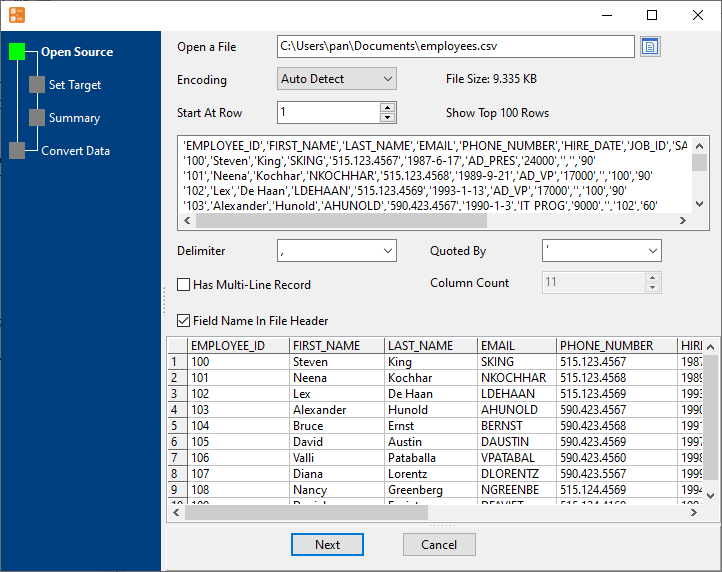
Nothing is uploaded anywhere - the file is read locally and the rows go to the database you name. If the run is interrupted, it can be repeated; what to do about the rows already loaded is your call (the tool does not silently skip or de-duplicate them).
What it will not do
- It will not guess a broken file. A mismatched delimiter, a bad encoding or lines with the wrong number of fields cause errors rather than silent repair. Check the preview first.
- It creates a table, not a schema. DBLoader can create the target table from the file's columns, but only the columns - indexes, primary keys, constraints and defaults are not created for you. For a large table you generally want the indexes added after the load anyway.
- It does not convert values beyond the columns' types. Dates, numbers and text are written as the mapping says; reformatting them is not part of the import.
- Speed depends on the link, the database and the hardware. Rows go over the client connection - it is not a server-side bulk load.
Related
Many files instead of one: a folder into one table. The mode itself: file to table. Repeating it: sessions, command line. Formats accepted: help.