FileToMongo » Use cases » One collection per file
Download FileToMongo Free Trial » Buy FileToMongo Now »
The situation
An export produced one file per table - customers.csv, products.xlsx, orders.json, plus a few dozen more - and each one is a different collection. The shape of the job is obvious and repetitive: open the file, name the collection the same as the file, map the fields, import, next.
Fifty files is fifty repetitions of the same four decisions, and one of them will be got wrong.
What you do
- Open Folder to Collections and point it at the folder. The files are listed.
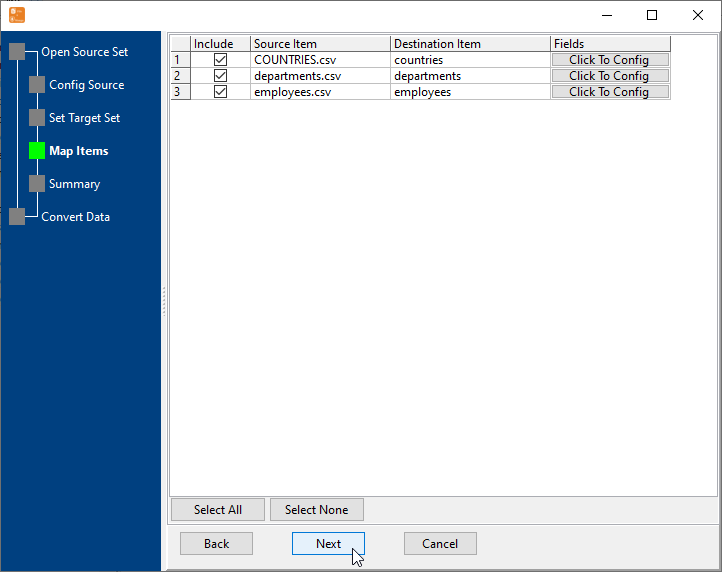
- Let the destination be derived from the file names, or set each destination collection yourself on the mapping screen - every file is one line, all visible at once.
- Configure the fields once where the files share a shape; the settings carry across the list.
- Run. Every file in the folder is imported in that single pass, into its own collection.
A new export can be dropped into the folder and the same saved session run again - which makes this a one-click load for a recurring handover, or a command for a scheduler.
What it will not do
- It does not reconcile files that disagree. The files are expected to be one-table exports. A folder mixing different formats, or files whose columns have changed since the last export, needs the mapping looked at again.
- It does not clean up after itself. Importing the same folder twice imports the same data twice unless the load mode says otherwise - there is no "already loaded" memory.
- It does not create indexes, validators or a schema. The collections are filled; what the application expects of them is configured on the MongoDB side.
- It does not work in the other direction. Exporting each collection back to its own file is MongoToFile.
Related
Every file into one collection instead: many files into one collection. A single file: load a spreadsheet, file to collection. The batch mode itself: folder to collections. Repeating it: sessions, command line.