FileToMongo » Use cases » Many files into one collection
Download FileToMongo Free Trial » Buy FileToMongo Now »
The situation
The data is already split: one file per month, one file per branch, one file per machine, or a CSV that was cut into pieces because that was the only way to get it out of the source system. The columns are identical, and in MongoDB they belong together in a single collection - the split was an artefact of the export, not a property of the data.
What you do
- Open Folder to Collection and point it at the folder (or select the files).
- Choose the single destination collection, and map the fields once - the mapping applies to every file in the set.
- Run. Each file is read in turn and its documents are appended to that one collection.
- If a document should say which file it came from, add that field to the destination and map the file name into it.
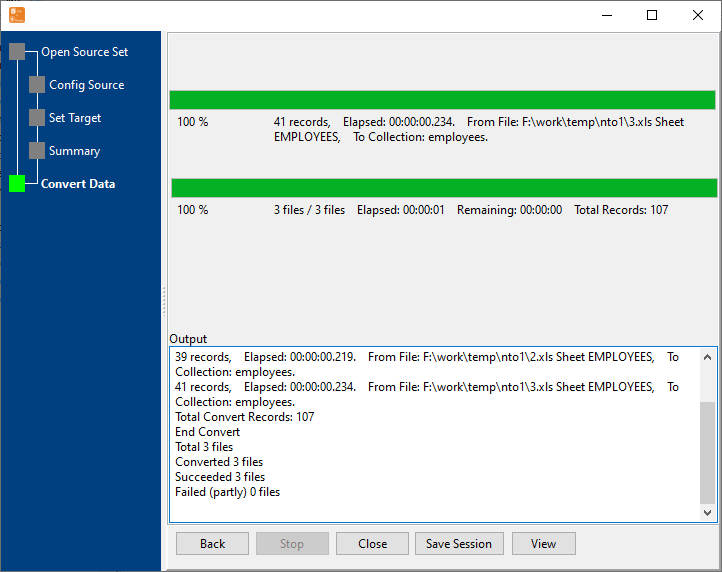
Doing it as one task rather than a dozen means one thing to re-run next month, one thing to schedule, and one log to read when something looks wrong. Rows are streamed in, so a large set of files does not need a large machine.
What it will not do
- It does not de-duplicate across the files. If the same record appears in the January file and again in January's correction file, both become documents. Cleaning that up is a separate step.
- It does not reconcile files that really differ. The files are expected to share a shape. A file with an extra column, a different delimiter or a different header will be mapped wrongly or rejected.
- It does not add the source file name for you. Provenance has to be a field you add deliberately.
- It does not build a nested document from several files. Each row becomes a document; joining two files into one document with sub-fields is not what this does.
Related
Each file into its own collection instead: one collection per file. A single file: load a spreadsheet. The batch mode itself: folder to one collection. Why not mongoimport: FileToMongo or mongoimport. Repeating it: sessions, command line.