FileToMongo » Use cases » Load a spreadsheet into MongoDB
Download FileToMongo Free Trial » Buy FileToMongo Now »
The situation
A department hands over an export, a system produces CSV because that is what it has always produced, or the reference data for a new collection exists as an Excel workbook on somebody's desktop. The destination is MongoDB, and the intermediate step everybody dreads is rewriting the file as JSON by hand.
Two things usually go wrong on the way: the columns have to be turned into fields, and the text arrives as mojibake because the file was written by a Windows program in a code page nobody mentioned.
What you do
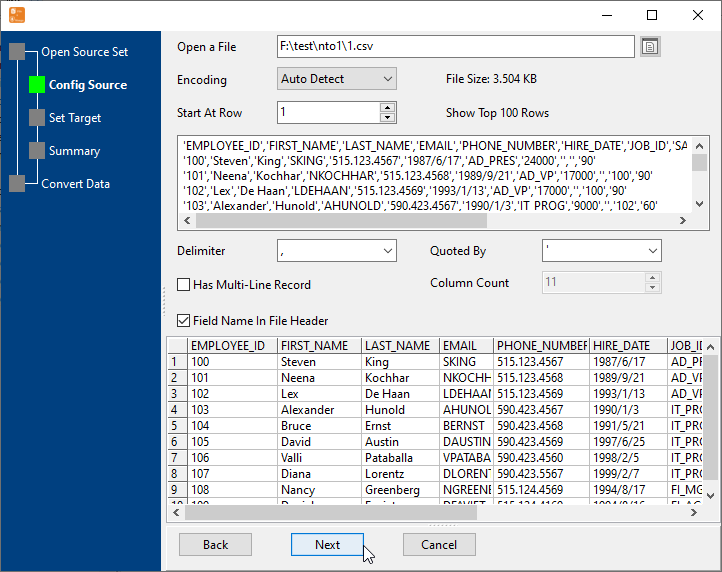
- Choose the file - CSV, TSV, TXT, Excel, JSON, JSONL, XML, HTML, RDF or SQL - and the delimiter if it is a text file.
- Leave Encoding on Auto Detect (UTF-8, GBK, ISO-8859-1 and the rest are recognised), or set it explicitly when you know what the file is.
- Because Field Name In File Header is on, the field names are taken from the first row - check the preview grid, which shows exactly what will be written.
- Connect to MongoDB, choose the collection (an existing one, or a new one) and run.
Millions of rows are streamed rather than held in memory, so the size of the file is a matter of patience rather than of RAM. None of it leaves the machine: the file is read locally and the documents are written to the MongoDB server you name.
What it will not do
- It does not design the documents. A CSV row becomes a flat document whose fields are named after the columns. Nesting, arrays and a different data model are not invented for you.
- It does not fix a file with no header. Without a header row the fields have to be mapped by hand, and a file whose columns moved between exports will be mapped wrongly - which is what the preview is for.
- It will not repair genuinely corrupted text. Encoding detection handles the common code pages; a file that arrived through a mail gateway that already mangled it stays mangled.
- It does not clean the values. Dates, numbers and trimmed strings are imported as they are read; there is no transformation step beyond the field mapping.
Related
Many files at once: one collection per file, or all of them into one collection. The single-file mode: file to collection. Why not mongoimport: FileToMongo or mongoimport. Doing it repeatedly: sessions, command line.