MongoToFile » Use cases » Nested fields in a flat file
Download MongoToFile Free Trial » Buy MongoToFile Now »
The situation
A file format is flat by definition. Every record has the same columns, in the same order, and each cell holds one value. A MongoDB document is not: it can carry an address object inside it, a list of tags, an array of line items.
The naive export puts the whole embedded object into one cell as text, which is readable by nobody and sortable by nothing.
What you do
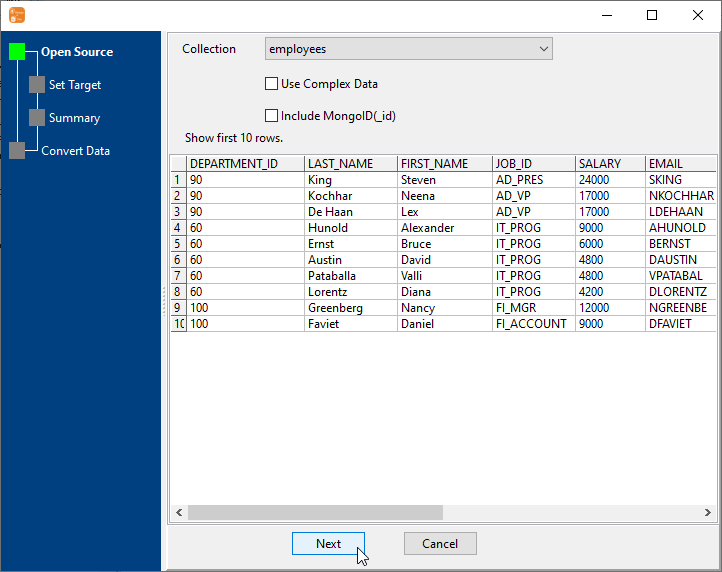
- Open the collection and look at the preview to see which documents have sub-fields.
- Start the export. Sub-documents and arrays are flattened into columns, so a document with nested fields becomes a row in a normal table rather than a cell full of braces.
- Choose the fields for the output - the flattened names are listed with the rest, so a nested field can be kept or left out individually.
- Write the file as CSV, Excel, TSV, JSON, XML, HTML or SQL and open it to confirm the columns are what you expected.
Large exports are streamed straight to the file as they are read, so the shape of the result does not depend on how much memory the machine has - the reason a ten-million-document export finishes on an ordinary laptop.
What it will not do
- It does not model the data for you. Flattening produces columns. Turning a list of order lines into a separate file with one row per line - the "explode" that a relational load would need - is a different job.
- It does not guarantee identical columns across a ragged collection. Where documents differ, the resulting file has the union of the fields, and rows are empty where a document did not have one.
- It does not pick the column order for you beyond the fields that exist. If the reader expects a fixed layout, set the field list deliberately rather than accepting everything.
- It does not convert types for a specific consumer. Dates, numbers and booleans are written for the format you chose; a reader with unusual expectations may still need a setting or a post-step.
Related
The export itself: collection to file, to Excel or CSV, or from a query: query to file. Many collections at once: collections to files. The same problem in a database: flattening into SQL columns.