SubtitleConverter » Use cases » The player will not show the subtitles
Download SubtitleConverter Free Trial » Buy SubtitleConverter Now »
The situation
The subtitle file is there, next to the video, correctly named - and the player ignores it. Or the TV shows a "subtitle format not supported" message, or the editing tool imports the video but not the captions.
Every player supports a slightly different set. One wants .srt, a web player wants .vtt, an old DVD-era file arrives as .smi or MicroDVD .sub, and a broadcast or accessibility workflow uses TTML or DFXP. The text is fine; the container is the problem.
What you do
- Point SubtitleConverter at the folder of subtitle files.
- Choose the format the player actually wants.
- Run it. Every file is converted, with its name kept, so each
.srtstill sits next to the matching video.
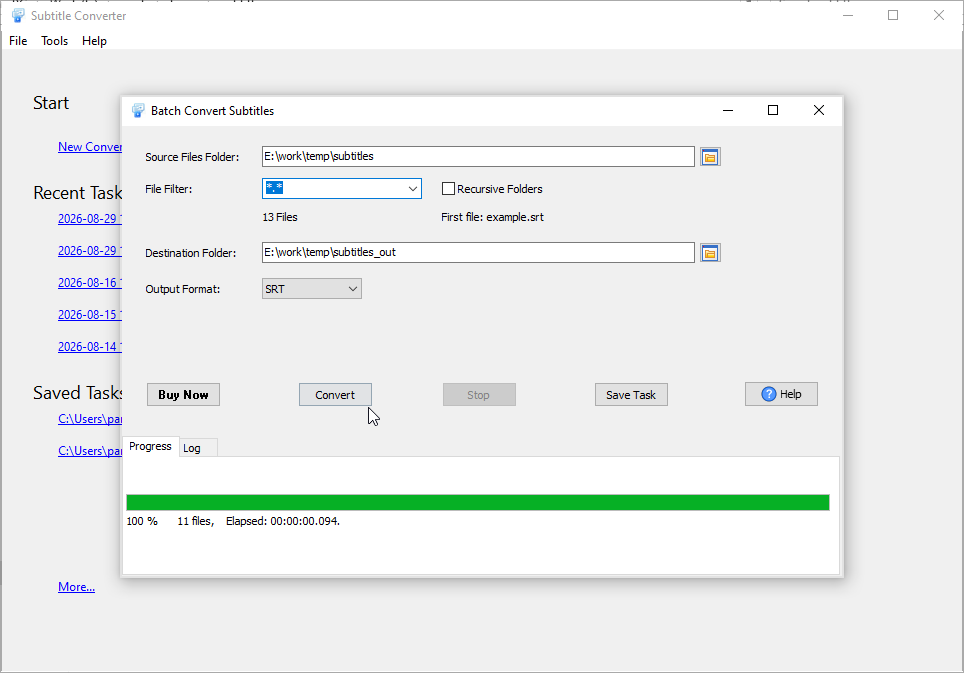
More than ten formats are supported - SRT, VTT, ASS/SSA, XML/TTML, DFXP, SMI, MicroDVD (.sub), SubViewer2.0, YouTube (.sbv), LRC and more - and the conversion is done on your machine, so a folder of subtitles never has to be uploaded anywhere.
What it will not do
- It does not retime the subtitles. It converts the format; if the captions are out of sync with the video, adjusting the timecodes is a different job.
- It does not translate. The text is carried across unchanged - there is no machine translation in the tool.
- It does not burn subtitles into the video, and it does not mux them into a container. It produces subtitle files.
- It does not style captions. Formatting that only exists in one format (advanced ASS positioning, for example) is not recreated in a simpler one.
Related
Converting a whole season in one go: batch convert subtitles. A single file: convert a subtitle file. Subtitles for a web player: SRT to VTT.