Subtitle Converter

Batch convert subtitle files effortlessly

Converting subtitle files one by one is a waste of time. SubtitleConverter is a fast, offline tool that batch-converts subtitle files (SRT, VTT, ASS/SSA, SMI, XML/TTML and more) between 15+ formats with the text untouched. It does not translate - it changes the container, not the language - and nothing is uploaded: your subtitles stay on your own machine.

Support Windows, Linux & macOS

subtitle converter

Key Features

Batch Conversion

Convert 1000+ subtitle files at once with recursive folder scanning. No file quantity limits for regular use.

10+ Format Support

Convert between all major subtitle formats with zero quality loss: SRT, VTT, ASS/SSA, XML/TTML, DFXP, SMI, MicroDVD (.sub), SubViewer2.0, YouTube (.sbv), SubRip(.srt), LRC and more.

100% Offline

All processing is local - your subtitle files never leave your device, protecting data privacy.

Cross-Platform

Works on Windows 10/11, macOS 10.15+, and Linux Ubuntu 20.04+ with the same easy-to-use interface.

How It Works

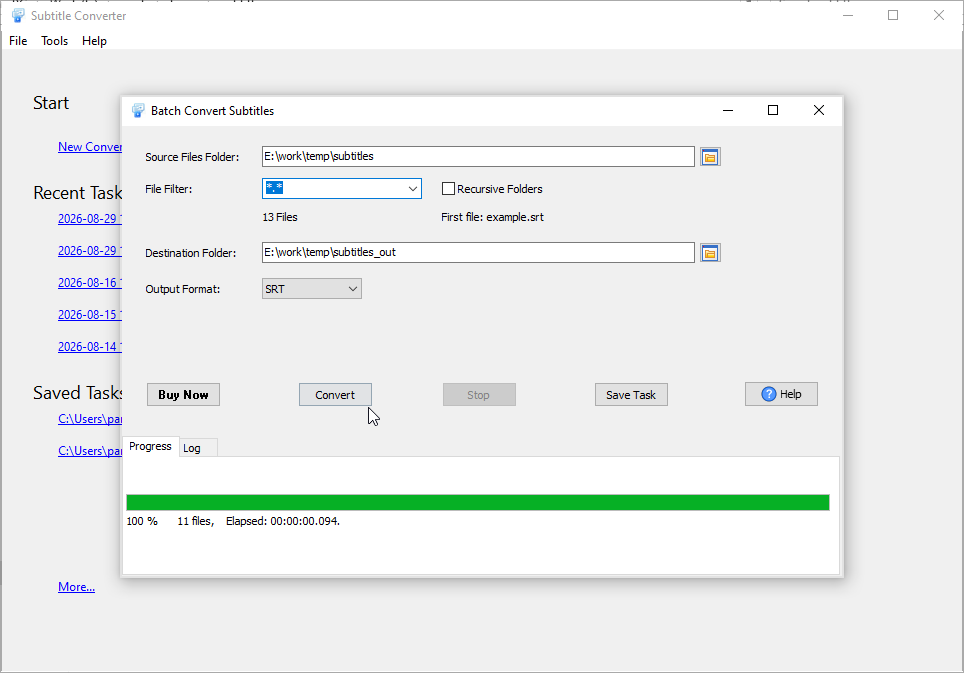
1

Select Source Folder

Choose the folder with your SRT subtitle files.

2

Choose Output Format

Select CSV/TXT or your desired subtitle format.

3

Start Conversion

Click convert and track progress in real-time.

Supported Formats

Most Popular Conversions: SRT ↔ CSV, SRT ↔ TXT, SRT ↔ VTT

SRT CSV TXT VTT ASS/SSA XML/TTML DFXP SMI MicroDVD (.sub) SubViewer2.0 YouTube (.sbv) LRC

What People Use It For

A subtitle file that has to change format, in a batch, with the text untouched: the player that refuses one container, the web page that needs another, the translator who wants a table, and the transcript that only needs the words.

The player will not show the subtitles

A TV, player or editing tool that will not accept the subtitle format you have.

The web player needs VTT, not SRT

Convert a folder of SRT files to WebVTT for HTML5 video - names kept.

Translate the subtitles in a spreadsheet

SRT to CSV with id, start, end and text - edit the text, then convert back to SRT.

Just the words, without the timestamps

Turn subtitles into a plain-text transcript, with or without simplified timings.

The subtitles must not leave the machine

Unreleased video, client work, material under NDA: batch-convert subtitle formats on your own computer, with nothing uploaded to an online converter.

Conversion Examples

SRT to CSV / TXT Conversion Examples

SRT → CSV
SRT → TXT
Original SRT File:
1
00:00:01,000 --> 00:00:05,000
Hello, welcome to our video.

2
00:00:06,000 --> 00:00:10,000
This is a subtitle example.

Converted CSV File:
"ID","Start Time","End Time","Text"
"1","00:00:01,000","00:00:05,000","Hello, welcome to our video."
"2","00:00:06,000","00:00:10,000","This is a subtitle example."

Note: CSV output includes structured columns for ID, start time, end time, and subtitle text. You can customize the CSV delimiter (comma, semicolon, tab) in the tool settings.

Original SRT File:
1
00:00:01,000 --> 00:00:05,000
Hello, welcome to our video.

2
00:00:06,000 --> 00:00:10,000
This is a subtitle example.

Converted TXT File (Pure Text):
Hello, welcome to our video.
This is a subtitle example.

Converted TXT File (With Timestamps):
[00:00:01] Hello, welcome to our video.
[00:00:06] This is a subtitle example.

Note: TXT output can be customized to include only pure text (without timestamps) or keep timestamps in a simplified format. The tool preserves line breaks and special characters.
Frequently Asked Questions

What subtitle formats does SubtitleConverter support?

SubtitleConverter supports 15+ subtitle formats, including SRT, VTT, ASS/SSA, XML/TTML, DFXP, SMI, MicroDVD (.sub), SubViewer2.0, YouTube (.sbv) and LRC. It is specialized in SRT to CSV/TXT conversion for easy subtitle data processing.

How many subtitle files can I convert at once?

There is no strict quantity limit. SubtitleConverter supports recursive folder scanning and can batch convert 1000+ subtitle files in a single run.

Does it translate the subtitles?

No. SubtitleConverter converts between subtitle formats; it does not machine-translate. If a subtitle has to be translated, convert it to CSV, let a translator or a translation tool work on the text column, then convert the CSV back to SRT/VTT - the timings are preserved either way.

Are my subtitle files uploaded anywhere?

No. Everything runs on your own computer. Subtitles often cover unreleased or client material, so nothing is sent to an online converter or a cloud service.

What is included with purchase?

All purchases include full license to use the software, free minor upgrades and free technical support by e-mail.