BillSight » Extract invoice data
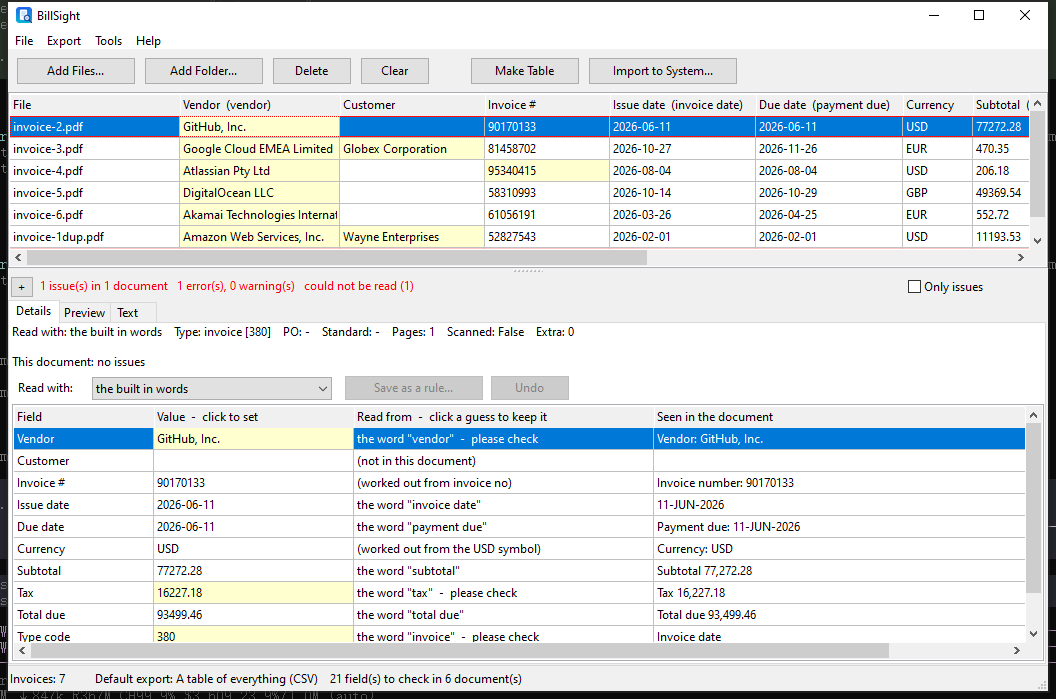
BillSight reads invoice PDFs and e-invoice XML and takes out the values a bookkeeper actually enters. Here is what it reads, where each value comes from, and what happens when a value is not clear.
BillSight » Extract invoice data
| Field | What it is | Where it comes from |
|---|---|---|
| Vendor | The company that sent the invoice, with its address and tax number where the document gives them. | The words on the page - "Invoice from", "Vendor", "Supplier", "Rechnungssteller", "Fournisseur" - or the e-invoice XML. |
| Customer | Who is being billed. | The words on the page, or the XML. Left empty when the document does not name one. |
| Invoice number | The number the supplier gave this invoice. | The label next to it ("Invoice number", "Rechnungsnummer", "N° de facture"), or the XML. |
| Invoice type code | 380 for an invoice, 381 for a credit note, 383 for a debit note - the code e-invoicing uses. | Worked out from what the document says it is; read from the XML when it carries the code itself. |
| PO number | The purchase order the invoice refers to, for matching against the order. | The label ("PO number", "Order no.", "Bestellnummer"), when the document carries one. |
| Issue date | The date the invoice was issued. | The date next to "Invoice date" / "Rechnungsdatum" / "Date of issue", or the XML. Read separately from the payment date, which is a different field. |
| Due date | The date it must be paid by. | "Payment due", "Due date", "Zahlbar bis" - kept apart from the issue date, so a payment date is not mistaken for one. |
| Currency | The ISO 4217 code, e.g. EUR, USD, GBP. |
The code on the page, a currency symbol with one obvious meaning, or the XML. Left empty when it genuinely cannot be told. |
| Subtotal, tax, total due | The three amounts your books need, each on its own. | The labelled amounts on the page, or the XML. Normalised to plain numbers with a dot: 1240.00, 1234.56. |
| Line items | The lines of the invoice: description, quantity, unit price and amount. | The e-invoice XML directly, or the table printed on the PDF. |
An e-invoice carries its lines as data, so they are read exactly - descriptions, quantities, unit prices, line amounts.
When the lines exist only as a table on the page, BillSight reads the columns by their headings, and falls back to scanning the rows when the table has no headings.
The line amounts have to reconcile with the stated subtotal. When they do not, the lines are left out rather than repaired - a wrong line is worse than a missing one.
From the words: the label next to a value is looked for in six languages, and the number is then read in the shape it is written in - 1.234,56 and 17 April 2026 come out as 1234.56 and 2026-04-17. From the XML: an e-invoice states its fields outright, so they are read, not recognised. Worked out: a few values are derived - the currency from a symbol that means only one thing, the type code from the kind of document - and those are the ones marked as a guess.
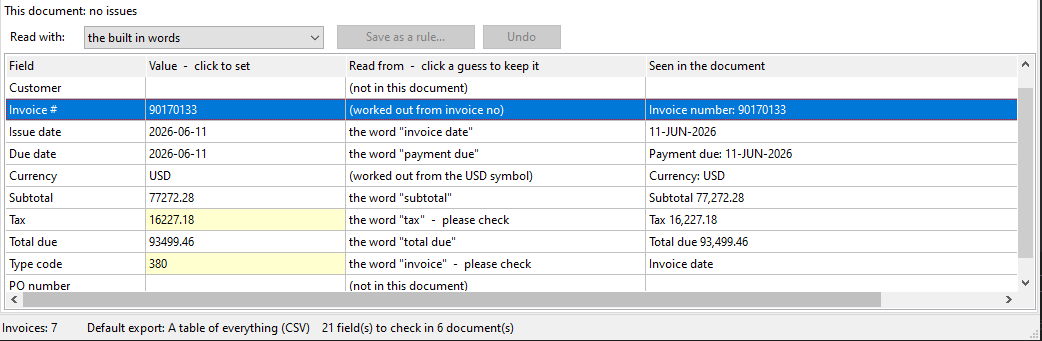
Each field carries the Read from - the word, the rule or the calculation it came from - and the Seen in the document line it was read on. Nothing has to be taken on faith.
A value BillSight is not sure of is tinted and says please check. That is where you look - not at every field of every invoice.
A wrong value is corrected in the cell, and the export uses what you left there. A guess you agree with is accepted in one click and stops asking.
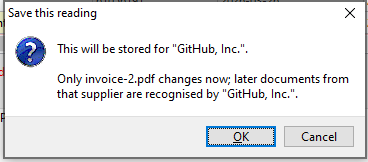
Some suppliers print what they like. Fix the value in the table once and save it as a rule for that supplier: the word or the position to read it from is kept, and the next invoice from them is read that way. It is stored in a file on your own computer, next to the other suppliers already known.
It will not read a scan or a photograph. When a document has no text layer, BillSight reports it as "this looks like a scan" and reads nothing from it - it does not guess a value and leave you to catch it. And it will not fill a gap: a field the document does not carry stays empty, and an amount or date that cannot be parsed is left blank.
See what happens with a folder of invoices, and with the awkward ones »
It stays empty. BillSight does not fill a field from a similar-looking number elsewhere on the page - an empty field is a fact you can act on, a wrong one is not.
The labels are looked for in English, German, French, Spanish, Italian and Dutch, and the numbers and dates are read in the local shapes (1.234,56, 17.04.2026). When a supplier uses something none of them cover, teach it once - see above.
Yes. An amount comes out as a plain number with a dot (1234.56), never with a thousands separator or a currency sign, and the currency comes out as an ISO code in its own column - so the file can go straight into a spreadsheet or an accounting import.
From e-invoice XML, exactly. From a PDF, from the printed table - and only when the lines add up to the stated subtotal, so a half-read table cannot quietly change your totals.
No, and it says so instead of guessing. A document with no text layer is reported as a scan. OCR is not part of this version.
Everything happens on this computer - your invoices are never uploaded.