Sometimes, you need to export MongoDB data to files, CSV, JSON, or other types, here are some tools you can use.
1. mongoexport
https://www.mongodb.com/docs/database-tools/mongoexport/
mongoexport is a command-line tool that produces a JSON or CSV export of data stored in a MongoDB instance.
MongoDB Export JSON
mongoexport –host=”mongodb0.example.com:27017″ –collection=events –db=reporting –out=events.json
MongoDB Export CSV
mongoexport –db=users –collection=contacts –type=csv –fieldFile=fields.txt –out=/opt/backups/contacts.csv
2. MongoDB Compass
https://www.mongodb.com/docs/compass/current/
MongoDB Compass is a powerful GUI for querying, aggregating, and analyzing your MongoDB data in a visual environment.
You can use MongoDB Compass to import and export data to and from collections. Compass supports import and export for both JSON and CSV files.
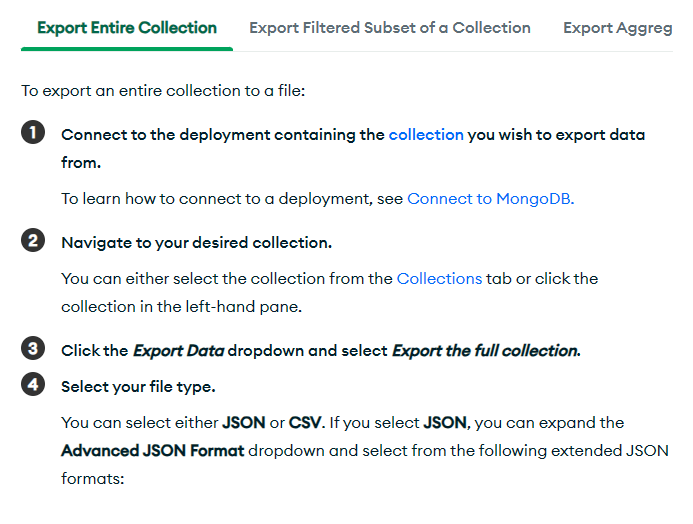
for details: https://www.mongodb.com/docs/compass/current/import-export/
3. WithData MongoToFile
https://withdata.com/mongo-to-file/
MongoToFile is a data conversion software that helps you to export MongoDB database data to CSV (TXT), SQL, JSON, XML, html, and Excel. Support all MongoDB deployment types: standalone, replica set, sharded cluster, and MongoDB Atlas.
Support Windows, Linux, and macOS.
Can run in GUI and CLI mode.


For details:
MongoDB Export database to CSV files
https://www.withdata.com/tools/mongodb-to-file/mongodb-to-csv
MongoDB Export database to JSON files
https://www.withdata.com/tools/mongodb-to-file/mongodb-to-json
more:
MongoDB export to TSV
MongoDB export to Excel
MongoDB export to XML
MongoDB export to SQL
MongoDB → JSON reference
Type mapping
| Value kind | in MongoDB | in JSON |
|---|---|---|
| Int | NumberInt / int32 | 1234 (number) |
| Bigint | NumberLong / int64 | 9007199254740993 |
| Decimal | Decimal128 | 1234.56 (number) |
| Float | Double | 1.234e10 (number) |
| Text | String | "text" (string) |
| Long text | String | "multi-line\ntext" (escaped newline inside a string) |
| Date | ISODate | "2026-09-18" (string) |
| Datetime | ISODate | "2026-09-18T14:30:00Z" (string) |
| Binary | BinData | "base64:..." (string) |
| Boolean | Bool | true / false (boolean) |
| JSON | Embedded document or array | nested object or array, kept as structure |
Dialect differences
MongoDB is a database server and JSON is a file format, so the gap is wider than a dialect difference – the rows below are where values and structure stop lining up.
| Property | in MongoDB | in JSON |
|---|---|---|
| port | 27017 | — |
| identifiers | No identifier quoting - names are plain strings | Double quotes; backslash escapes |
| row limit | .limit(n) / $limit aggregation stage | — |
| dates | ISODate() / BSON date (millisecond epoch internally) | No date type: dates arrive as strings and the reader must p... |
| long text | String (BSON string, no length limit) | — |
| binary | BinData (BSON binary subtype) | Not supported natively - base64 inside a string |
| separator | — | Braces and commas |
| encoding | — | UTF-8 by definition |
| typing | — | string, number, boolean, null, object, array - no date type |
| shape | Collections of documents with optional nesting | Nested objects and arrays |
| ceiling | — | Whole document is usually parsed into memory |
Command line
| Side | Command |
|---|---|
| MongoDB | mongoexport --collection=c --out=f.json |
| MongoDB (load) | mongoimport --collection=c --file=f.json |
MongoToFile without the manual work
For batch jobs, large files and scheduling use the MongoToFile converter — an offline desktop app for Windows, Linux and macOS. Free trial.
New to the format? Read what a TSV file is (and how it differs from CSV).


