DBBlobEditor » Use cases » Edit CLOB text in place
Download DBBlobEditor Free Trial » Buy DBBlobEditor Now »
The situation
Some applications store documents in the database rather than on disk: a letter as RTF, a template as HTML, a configuration as XML, an API payload as JSON, a contract as plain text. The column is a CLOB, TEXT, NTEXT or VARCHAR(MAX), and one of those values needs a small correction.
A SQL client is the wrong place for it - editing a paragraph inside a bracketed string literal, in a grid cell that shows the first 200 characters, is how values get truncated.
What you do
- Open the row's value. It is shown as what it is: RTF as formatted text, HTML as HTML, XML and JSON as markup, plain text as text.
- Edit it in the editor - the whole value, not the visible part of a grid cell.
- Save. The value is written back with its formatting preserved, so an RTF header or a JSON structure survives the round trip.
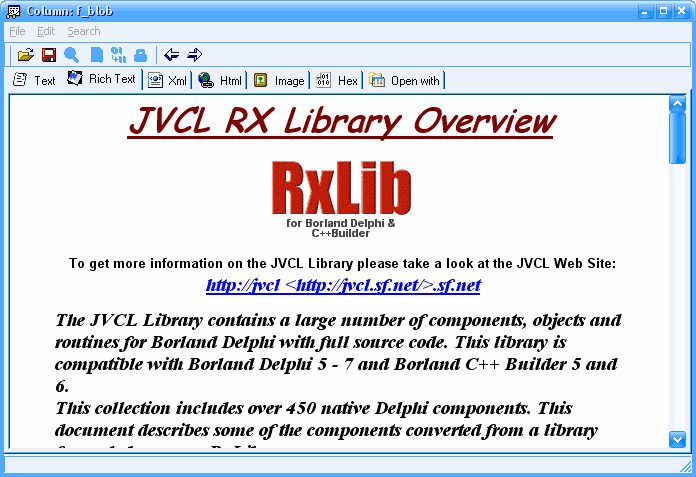
The same editor handles the awkward cases that make a CLI approach unpleasant: documents with quotes, newlines and non-Latin characters, and values large enough that a string literal would be unmanageable. Other columns of the row are untouched.
What it will not do
- It does not validate the document. A JSON value with a missing brace is accepted and stored; the application that reads it will be the one to complain.
- It does not undo. The previous value is gone once you save. Keep the row's value elsewhere if the change is risky.
- It does not trigger the application's own update logic. Writing to the table bypasses whatever validation, history or audit the application would have applied.
- It does not reformat anything. Formatting is preserved as it was, which also means nothing is prettified or normalised on the way in.
Related
Binary columns instead of text: see what is in a BLOB column. Editing many values at once: load files in bulk. When even the editor is not the right place: open it externally.