DBBlobEditor » Use cases » Load files into a BLOB column
Download DBBlobEditor Free Trial » Buy DBBlobEditor Now »
The situation
A directory holds the files that belong in the database: scanned statements, photographs, PDFs, audio clips. Each file corresponds to a row - matched by a file name, an ID or a column value - and the contents have to end up inside a BLOB column. In the other direction, the column may hold documents that people need as files again.
Doing that through the application means writing a loader around it. Doing it through a SQL client means encoding and quoting binary data by hand, which does not work for anything larger than a few kilobytes.
What you do
- Choose batch import and point it at the folder, or at a list of files.
- Say how a file is matched to a row: the file name against a column value, or a mapping of file to key.
- Choose the destination table and the LOB column, and run. Each file is read and written into its row - images, PDFs, video, audio or text.
- For the reverse, choose batch export and let the column be written back out one file per row, with the names you specify.
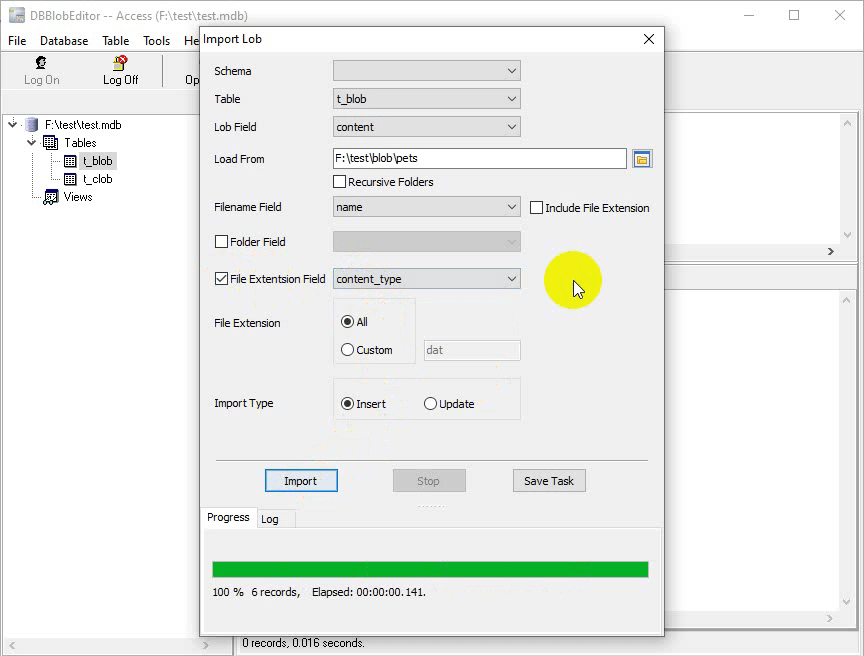
The job can be saved and re-run, which is what makes it useful for a recurring delivery: a folder that is refilled every month, loaded into the same table with the same matching rule. The CLI mode exists for the same reason - see automating it.
What it will not do
- It does not resize, convert or compress the files. The bytes of the file are the bytes of the value. Turning a 4 MB photo into a thumbnail is image processing, not loading.
- It does not decide which row a file belongs to. The matching rule is yours; a folder of files with names that do not correspond to anything in the table will fail or match nothing.
- It does not update the rest of the row. Other columns are left alone - which is usually what you want, but it means a file cannot create a row by itself.
- It does not work around the database's own limits. Very large LOBs depend on the server and driver configuration; a value that the database refuses to accept is still refused.
Related
The mode itself: batch import and export LOB data. What it looks like afterwards: see what is in a BLOB column. Opening a value externally: external viewer or editor. Recurring loads: command line and scheduling.