DBBlobEditor » Use cases » Open it with another program
Download DBBlobEditor Free Trial » Buy DBBlobEditor Now »
The situation
Most binary columns hold something recognisable - an image, a PDF, a clip. Some do not: an Access database stored as a BLOB, a CAD drawing, a document format from a vertical application, a file whose extension was never recorded anywhere.
Those values need to leave the database for a moment and be opened by the program that understands them. That should not require writing an export script for one row.
What you do
- Open the value. Anything the editor cannot display lands in the HEX view, which is also where you can recognise a file signature at the start of the bytes.
- Switch to the External Open page for that value.
- Set the file extension the value should be given, then choose the program: the tool lists the file types registered on the machine, so you pick one by double-clicking it rather than typing a path.
- Click Open. A temporary file with that extension is written and handed to that program, where the object can be inspected or edited as it normally would be.
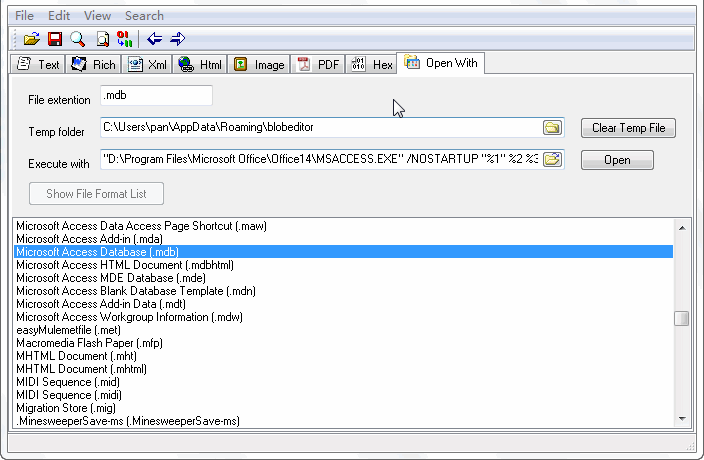
The extension is what makes this work: it is how the operating system decides which program to launch, and how the program decides how to interpret the bytes. For a format you know the extension of but have no viewer for, the same page is still the way to get the value out as a file.
What it will not do
- It does not write the edited file back. The temporary file is for inspection and editing outside the database; putting a changed version back is a deliberate import step, not an automatic one.
- It needs the program to be installed. The list is the machine's registered file types - if nothing on the machine opens the format, there is nothing to launch.
- It cannot guess an extension. Words in the hex view may hint at the format, but the extension is a decision you make; the wrong one opens the wrong program with the right bytes.
- It writes a temporary file to disk. For sensitive data, know where that file goes and that it is cleaned up afterwards.
Related
The mode itself: open LOB data with an external tool. Formats the tool shows natively: see what is in a BLOB column, multiple formats. Text values instead: edit CLOB text in place. Getting the whole column out: batch export.