DBBlobEditor » Use cases » See what is in a BLOB column
Download DBBlobEditor Free Trial » Buy DBBlobEditor Now »
The situation
A table has a BLOB column - a photograph, a scanned statement, a PDF, a short video, a signature - and something needs checking. Which record has the image? Is this row's PDF the current one? Did the import put the right bytes in the right row?
A SQL client is no help here: the value is binary, and what it shows is either a truncated wall of characters or an error. Querying the size tells you nothing about what is actually in there.
What you do
- Connect to the database and open the table. The LOB columns are marked as such, so you can see which ones these are.
- Open a row's value and it is shown the way it was meant to be seen: an image as an image, a PDF as a PDF, a video or audio value playing in place.
- Whatever is not a known format falls back to a HEX view, so nothing stays a black box - you can at least see the bytes and recognise a header.
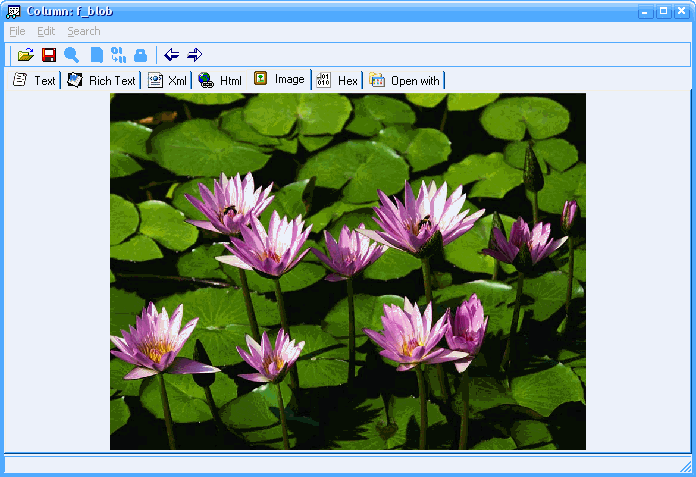
The same works for CLOB columns, where the question is usually formatting rather than bytes: a value stored as HTML, XML, JSON or RTF is shown as such, not as its source text. And because the value is read from the database you already have open, there is no export step to get in the way.
What it will not do
- It does not know your application's encoding. If the bytes are compressed, encrypted or in a proprietary format, the tool shows them (as HEX) - it cannot guess how they were packed.
- It is not a media player for very large values. Playing a large video pulls the value through the client; a multi-gigabyte LOB is better handled by saving it and opening it externally.
- It does not repair a broken value. Bytes that were stored incorrectly are still incorrect - you can see that they are wrong, which is the first step, but the fix is a write.
- It does not browse a whole table as a gallery. You open a row's value when you want it; there is no thumbnail wall of a million photographs.
Related
Correcting what you find: edit CLOB text in place. Opening it in another program: external viewer or editor. Getting files in and out in bulk: load files into a BLOB column. Formats and databases: multiple formats, supported databases.