DBBlobEditor » Use cases » Sync from the command line
Download DBBlobEditor Free Trial » Buy DBBlobEditor Now »
The situation
Ordinary row data is easy to protect - the database's own dump handles it. The LOB columns are the awkward part: they are huge, they are often excluded from backups to keep them small, and the documents inside them are exactly the files an organisation cannot lose.
Keeping a copy by clicking through an export each week does not survive a busy month. The job has to run by itself, and it has to be visible when it fails.
What you do
- Set the export up once in the GUI - the table or query, the LOB column, the output folder and the file naming - and save it as a task.
- Give that task to the CLI mode, so it can run without a window: on Windows via Task Scheduler, on Linux and macOS via cron.
- Schedule it as often as the data changes. Each run reads the rows and writes the files; the log says what it read and what it wrote.
- For the reverse direction - files back into the column - the same saved task and CLI run applies, which is how a synchronised pair of environments is kept in step.
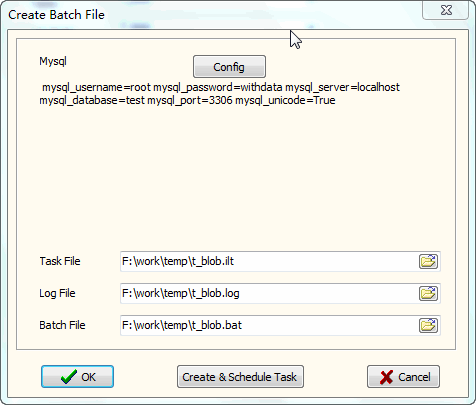
Because the task is a saved configuration rather than a script around the tool, changing the query, the folder or the destination is a matter of editing the task once - and every machine that runs it follows. See saving and loading tasks and scheduling a task for the mechanics.
What it will not do
- It is not database replication or change data capture. There is no trigger and no log reading. The copy is as current as the last run.
- It does not alert anyone. A failed run shows up in the exit code and the log; wiring that into monitoring is a separate step.
- It does not know what it wrote last night. There is no state or "already exported" memory - the naming and the folder layout are what keep the copies distinguishable.
- Scheduling is the operating system's job. DBBlobEditor runs the task when it is called and needs to be installed and licensed on the machine that does.
Related
The mechanics: command line, save and load a task, schedule a task, automating BLOB synchronisation. The export itself: batch import and export LOB data, files into a BLOB column. Checking the result: see what is in a BLOB column.