ExcelDataTransformer » Use cases » Consolidate sheets from everyone
Download ExcelDataTransformer Free Trial » Buy ExcelDataTransformer Now »
The situation
The monthly return, the expense claim, the stock count: fifteen people each fill in a workbook from the same template and send it back. Fifteen files, fifteen worksheets, and somebody has to turn them into one sheet - usually by opening each file, copying the rows and pasting them at the bottom of a growing master, hoping nobody added a column in the middle.
It is exactly the kind of manual step that is done slightly differently every month, and no one notices until a total is wrong.
What you do
- Put the returned workbooks in one folder.
- Choose the merge: the sheets of several files into a single sheet (or one sheet per file, if that is what the review needs).
- Run it and check the row count.
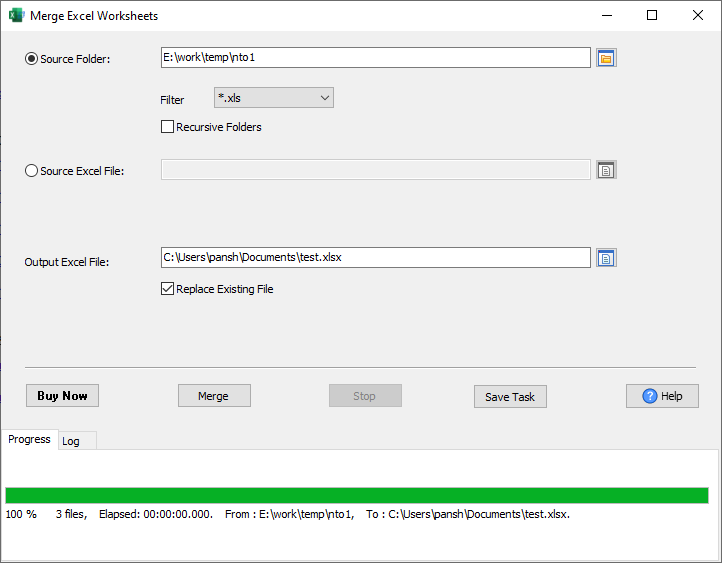
The repeated header row is skipped, so the result is one header and fifteen times the rows, not fifteen headers stacked in the middle. Rows are appended by column position: this works when everyone filled in the same template in the same order - which is the point of sending a template. If somebody inserted or moved a column, that file has to be aligned first (in Excel, or with DataFileConverter's column mapping); the merge does not re-order columns by their names, and it does not check the values.
What it will not do
- It does not validate the returns. It merges what is in the files; whether the numbers are right, or a required cell is empty, is not something it checks.
- It does not de-duplicate. A row sent twice is merged twice. Combine with a check on your side if that matters.
- It is not a spreadsheet editor, and it does not convert formats - for CSV, JSON or SQL, use DataFileConverter.
- It does not chase the returns. It merges the folder it is given; collecting the files is a process, not a feature.
Related
Merging: merge Excel worksheets, merge Excel workbooks. Guides: merging sheets by name, many files into one sheet. Repeating the same merge every month: saved session.