ExcelDataTransformer » Use cases » Merge Excel worksheets
Download ExcelDataTransformer Free Trial » Buy ExcelDataTransformer Now »
The situation
A folder of workbooks - one per day, per region, per shop, per person - and what somebody actually needs is one sheet: one header row, every data row underneath it, ready to filter or total. Opening each file, selecting the rows and pasting them at the bottom of a master sheet works for three files and stops working at thirty, because the header row keeps coming along with the paste.
What you do
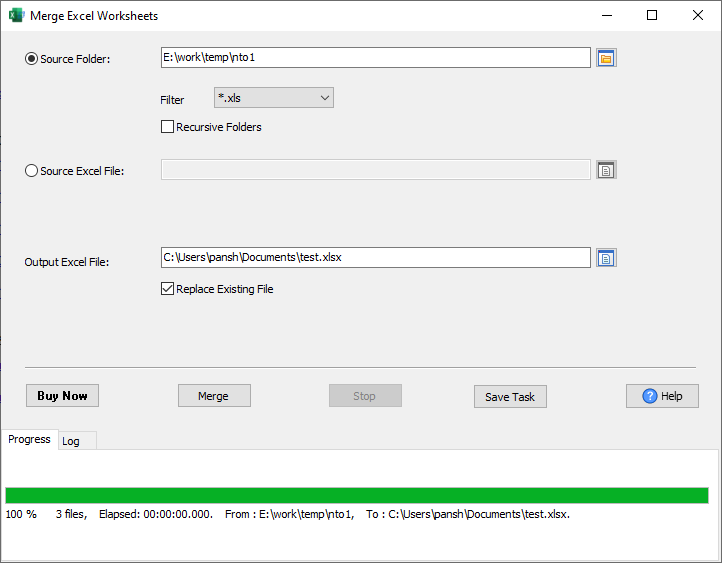
- Choose Merge Worksheets and point it at the folder (or at a single workbook). A filter such as
*.xlsxand the recursive option pick up everything below it. - Choose the output workbook. The first source sheet becomes the target; the rest are appended to it.
- Run it and check the row count. If this is a monthly job, press Save Task so the same configuration can be run again next month.
What it does, precisely
- One sheet out. Every worksheet of every matching workbook is appended to the first sheet of the output workbook - the rows, in file order.
- The header row is not repeated. Each source sheet's first row is compared with the output sheet's first row; when the text is identical the row is treated as a header and skipped, otherwise it is copied as data.
- Subfolders and filters. Recursive scan plus a file mask (
*.xlsx,*2026*.xls, ...). - The previous output is kept. An existing output file is renamed to
.bakbefore writing, or appended into a copy, depending on the replace option. - Large folders are reported, not silent. Progress counts sheets and rows; a file that cannot be read is logged as a failed row instead of aborting the whole run.
- No Excel, no cloud. .xlsx/.xls are read and written by the app itself - Windows, macOS, Linux, offline.
What it will not do
- It does not line the columns up for you. Rows are appended by column position, so exports whose column order differs must be aligned first. (The header comparison only decides whether a row is a header.)
- It does not aggregate. No group by, no totals, no pivot - it appends. Do the grouping in a database (FileToDB) or with a pivot table.
- It does not de-duplicate. A row present in two files is merged twice.
- It does not edit the source files. They are read only.
Related
Merging: merge Excel workbooks (sheets kept separate), consolidate sheets from several people, a year of monthly exports. Splitting: split a worksheet, split a workbook. Repeating the job: command line, saved session. Guides: many files into one sheet, all sheets of one workbook into one, merging sheets by name. Converting instead: DataFileConverter (CSV, JSON, SQL).