ExcelDataTransformer » Use cases » Merge Excel workbooks
Download ExcelDataTransformer Free Trial » Buy ExcelDataTransformer Now »
The situation
Twelve monthly exports, one folder, and the request is "send me the year in one file". Not one sheet - the months have to stay apart so each can be looked at on its own - but one workbook, with the same sheet names as before, instead of twelve attachments nobody will open.
What you do
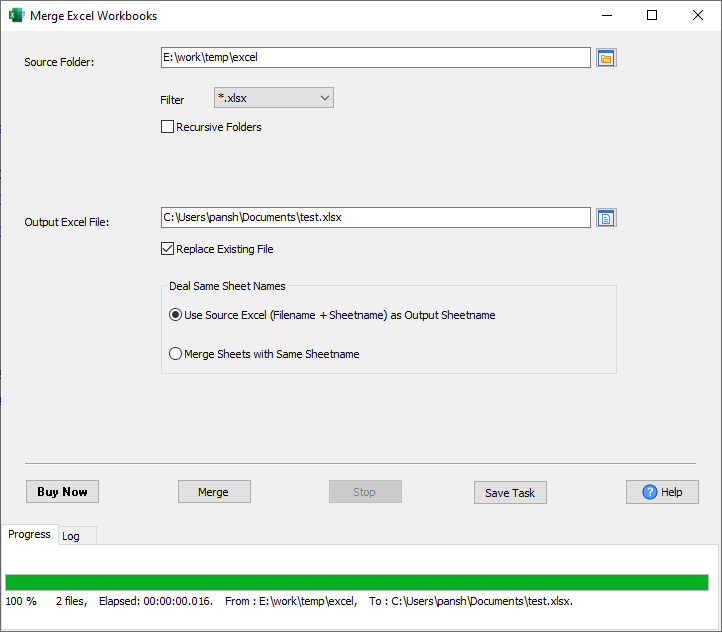
- Choose Merge Workbooks, add the files (or point at the folder with a filter and the recursive option).
- Choose the output workbook and how existing sheets should be treated.
- Run it. Each source worksheet keeps its name; a sheet that already exists in the output gets the incoming rows appended to it.
What it does, precisely
- Two modes for a repeated sheet name. Keep them apart: every incoming sheet keeps its own name, duplicates become
file_Sheet(so January's Data and February's Data both survive). Merge them: a sheet whose name already exists gets the incoming rows appended to it. Pick the mode when you set up the task. - Header rows are not repeated. Before appending, the source sheet's first row is compared with the target sheet's first row; identical text means "header, skip", anything else is copied as data.
- Files are processed in the order you give them, so a predictable naming scheme (
2026-01.xlsx,2026-02.xlsx) gives a predictable result. - The previous output is kept as
.bakbefore being replaced. - Unreadable files are reported as failed rows in the log instead of aborting the run.
- Save the task to repeat the same merge next month without re-selecting anything.
What it will not do
- It does not line columns up. Appended rows go in by column position; exports whose column order differs must be aligned first. The header comparison only decides whether the row is a header.
- It does not total or group. Use a pivot table or load the result into a database (FileToDB).
- It does not merge formulas across workbooks. Values come across; cross-file references are not rewritten.
Related
Merging: merge excel worksheets into one sheet, a year of monthly exports, sheets from several people. Splitting: one file per sheet. Automating: command line, scheduled task. Converting instead: DataFileConverter.