MongoLoader » Use cases » Export, edit, import back
Download MongoLoader Free Trial » Buy MongoLoader Now »
The situation
Not every correction happens in an application. A price list gets updated by hand, a list of product descriptions is rewritten by the marketing team, a set of customer records is fixed in bulk after a data problem. The practical way to do that work is a spreadsheet - and then it has to go back.
Exporting is the easy half. Loading the edited file back is where it goes wrong: a plain import adds a second copy of every row, and now the collection has duplicates with different values.
What you do
- Export the collection to Excel or CSV, with the fields the editor needs. Saving it as a session means the next export is one click.
- Let the file be edited - the rows that did not change stay in place.
- Import the file back into the same collection, and choose update or upsert rather than insert.
- Map the incoming fields onto the document fields, and nominate the key the match is made on - the field that identifies a document (
_id, or your own business key).
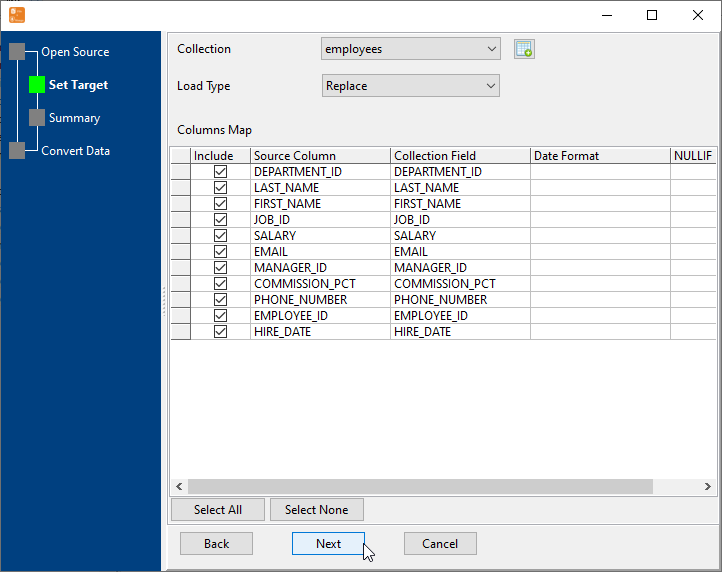
With upsert, a row whose key already exists updates that document; a row with a new key becomes a new document. That is what makes the round trip repeatable - the same file can be loaded twice without the collection growing.
What it will not do
- It does not merge field by field. Update replaces the mapped fields from the file. If the editor deleted a value, the new value replaces the old one - there is no per-field "keep the higher number" rule.
- It will not find documents by a key you did not map. The match key has to be one of the imported fields, and it has to be stable. A key that the editor is free to change turns updates into inserts.
- It does not delete documents for rows the editor removed from the spreadsheet. That is a separate decision, and a dangerous one to make implicitly.
- It does not track who changed what. There is no audit trail - the collection ends up with the spreadsheet's values and no history of the previous ones.
Related
The two halves on their own: export a collection to a file, import a file into a collection. Cleaning the export before it goes out: clean the data on the way out. Both directions in one tool: one tool for both directions. Repeating it: sessions, command line.