Download free trialBuy TextMerger
How to merge monthly CSV exports into one
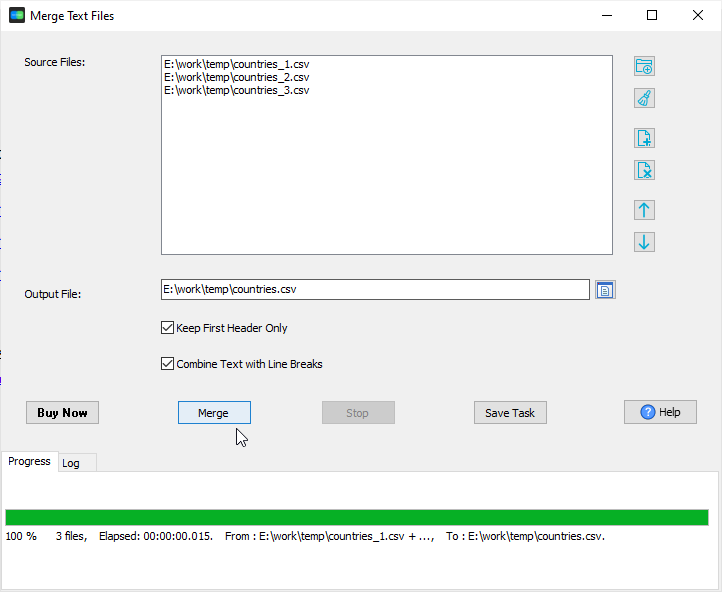
- Open TextMerger and click New Task.
- Add the monthly files - or Add Folder... on the export folder and take all twelve at once.
- Drag the list so the months run in order, then click Merge.
- Save the list as a session if next year's merge should use the same order.
What happens to the header rows
By default TextMerger concatenates the files as they are: every file keeps its own first line, so the merged file has twelve header rows. Tick Keep First Header Only to keep the first file's header and drop the repeated ones - the merged CSV then has exactly one header at the top.
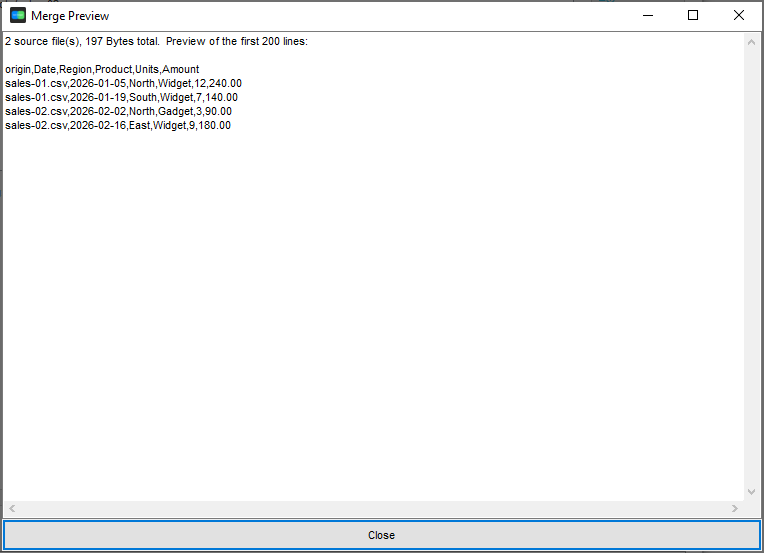
Combining exports from more than one system? Tick Add source file name column to prefix each line with the file it came from, and Remove duplicate lines to drop repeated rows while merging. If the months were exported in different encodings, you can also convert them to one output encoding on the way - see merging files with different encodings.
Why the order is worth controlling
File names sort wrong more often than people expect: export-1.csv, export-10.csv, export-2.csv. TextMerger 1.1 sorts the source files in natural order (so export-2 comes before export-10) or by modified time - and you can still drag the list into any order you want. The merged file then reads the way the year actually happened.
Why not an online merger
Monthly exports are business data. TextMerger is an offline desktop application, so the files never leave your computer, and there is no upload cap - merge the whole year, or several years, in one run.
Related tools
Loading the merged file into a database: FileToDB. Converting the merged file to another format: DataFileConverter. Merging in the browser: merge CSV files. Full reference: merging text files.