It is the 30th, and forty invoices have to become one spreadsheet

The invoices have been arriving all month - PDFs mostly, a few e-invoice XML files, whatever each supplier sends. Accounts wants one file with a row per invoice. This is what that afternoon looks like with BillSight.

The Situation

The folder holds the month: C:\Invoices\2026-09. Forty files, from twenty-odd suppliers, in half a dozen layouts. Nobody is going to type forty invoice numbers, dates and totals into Excel - and nobody should. What is needed is the table, with the wrong ones pointed out rather than hidden.

What You Do

1

Add Folder...

Point it at 2026-09. Sub-folders come too, and both PDFs and e-invoice XML files are read - a mixed folder is not a problem.

2

Check the reading

Every invoice is now a row, and the fields the reader is unsure of are tinted and marked please check. You work through those - a handful, not forty.

3

Make Table...

Excel with the columns accounts asked for. The column set is saved, so next month's export is the same one click.
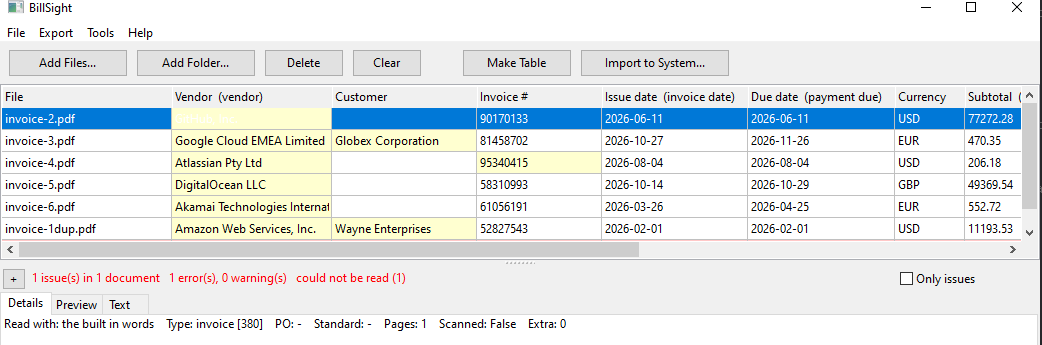
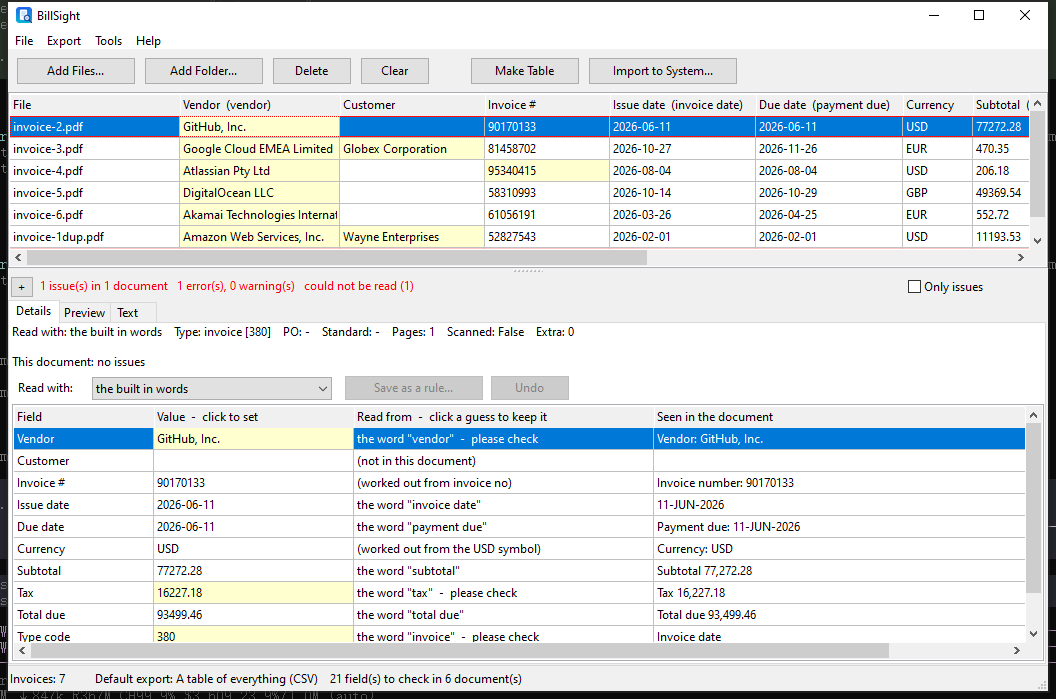
Forty invoices read into one table, one row each

What You Get

One file, one row per invoice

invoices-2026-09.xlsx - 41 rows (a heading and forty invoices)

File | Vendor | Invoice # | Issue date | Due date | Currency | Subtotal | Tax | Total due | Type code

And the things that did not fit:
- the one file that would not open is a row, with the reason
- the invoice that arrived twice is flagged as a duplicate
- the scan is named as a scan, not filled in

Note: amounts come out as plain numbers and the currency as an ISO code, so the file goes straight into the accountant's spreadsheet with no cleaning.

Why It Holds Up

Nothing is skipped quietly

A file that cannot be read becomes a row of its own with the reason, and the run ends with a summary: Added 38, 2 could not be read. You know what is missing from the table, instead of finding out at the audit.

The duplicate is caught

If a supplier sent the same invoice twice, it is flagged on the supplier and the invoice number - so it does not quietly become two rows and two payments.

Checked before the file is written

Subtotal plus tax against the total, dates that cannot be right, missing fields - all checked, and the export can be stopped while you go back to the rows.

The originals are kept

Every invoice is copied into a local archive as it is read, addressed by its content - so you can still show what arrived, and prove it has not changed since.

Checking one of the invoices, with the fields and where each value was read from

Frequently Asked Questions

How long does a folder of forty invoices take?

Seconds for the reading itself - it is local, with no upload and no queue. The time you spend is on the handful of values it asks you to check.

What if one is read wrongly?

Fix it in the table, and the export uses what you left there. If it is a supplier you deal with every month, save the correction as a rule for them and next month it is read that way.

Some of them are scans - what then?

They are reported as scans and left out of the table's numbers, rather than guessed at. OCR is not part of this version; an invoice that arrives as e-invoice XML is read exactly.

Do I need to send the invoices anywhere?

No. Everything runs on your own computer, and what you hand over is the spreadsheet.

Other Things People Do With It

Checking whether an invoice has already been paid · Proving what arrived, and that it has not changed · Keeping the invoices off somebody else's server · What a batch run does with the awkward files

Everything happens on this computer - your invoices are never uploaded.