RedisDataStudio » Use cases » Export a slice of Redis
Download RedisDataStudio Free Trial » Buy RedisDataStudio Now »
The situation
Redis is a working store, not a reporting database, so the questions come with a small complication: the data is needed outside it. A colleague wants the tenant settings as a spreadsheet. Somebody is investigating a caching bug and needs the keys as they are right now. A namespace is about to be changed and a copy would be wise before that happens.
A full dump is the wrong shape for all three - it is a binary artefact for restoring, not something a person or a spreadsheet can read.
What you do
- Start an export and choose what to take: a whole namespace, a selection of keys, or a slice selected by data type or a custom filter.
- Choose the output format: CSV, Excel, JSON, XML, TXT. For a hash or a namespace of hashes, the fields become columns.
- Pick the destination folder and file name, and run. Many keys go to many files when that is what you asked for.
- Save it as a session when the same slice is wanted again - or a command for a scheduled copy.
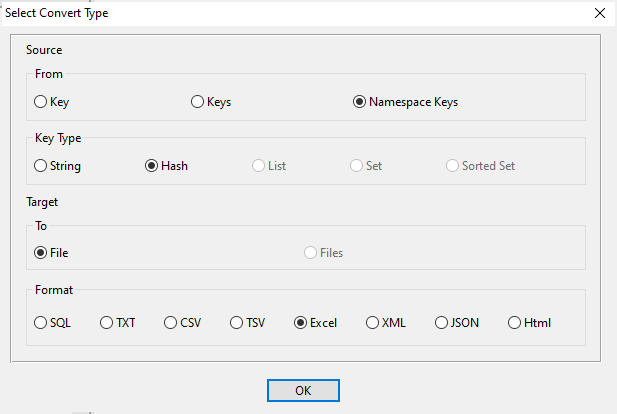
The file is written locally and nothing is uploaded, which matters when the keys contain customer identifiers or anything else that should not travel through a service. What you hand over is a file, and what you keep is a readable copy of that slice as it was at that moment.
What it will not do
- It is not a Redis backup. A CSV of a namespace cannot be used to restore a server. Redis's own persistence, or
DUMP/RESTORE, is the backup route; this is a readable extract. - A key that expires mid-export is gone. The export reads the keys that are there when it runs; TTLs are not preserved in the file.
- It does not format the result. Fields, rows and headers - that is all. Charts, totals and pivot layouts belong where the file is opened.
- It does not follow references. If a value contains the name of another key, that relationship is written as text, not resolved.
Related
The modes: a namespace, a single key. Loading one instead: CSV or Excel into a namespace. Checking a key before changing it: browse the keys, fix one wrong value. Formats and conversions: Redis to CSV, Redis to Excel, Redis to JSON.