RedisDataStudio » Use cases » Load a namespace from CSV or Excel
Download RedisDataStudio Free Trial » Buy RedisDataStudio Now »
The situation
Redis is holding reference data that somebody maintains somewhere else: a product catalogue, a set of currency rates, a routing table, a per-tenant configuration. The file exists - a CSV, an Excel sheet, a JSON export - and it has to become keys under one prefix (product:, rates:, tenant:), with hundreds or thousands of them.
Doing that by hand in a GUI is not a plan, and writing a loop of SET/HSET commands is a script to maintain and to get wrong.
What you do
- Start an import and choose the source: CSV, Excel, JSON, XML, or a table from a relational database (MySQL, Oracle, SQL Server, PostgreSQL and more).
- Choose the shape the file should become in Redis: many keys under one namespace (a row per key), or all rows into one hash key.
- Map the columns: which column is the key, which column is the value or the field name, and which namespace the keys land in.
- Preview, then run. Save it as a session so the next data refresh is one click - or a command in a scheduled task.
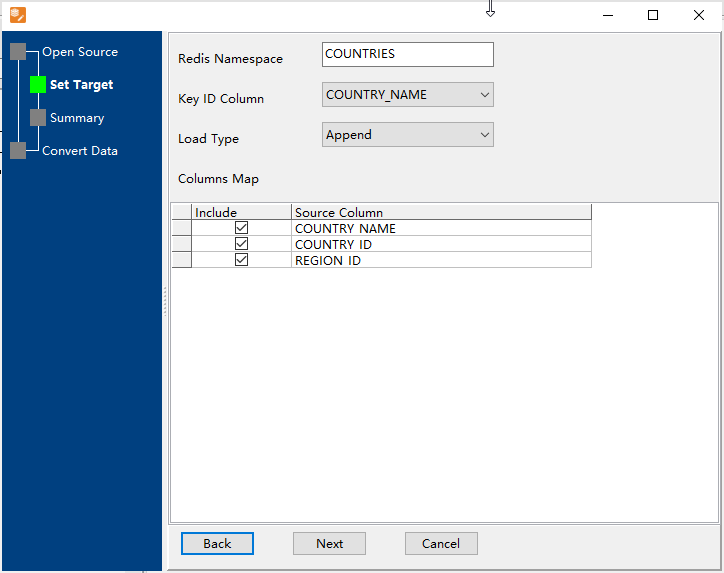
A folder of files is handled the same way in one run, and because the work is local, loading a production Redis does not mean sending the data through anybody else's service. Password authentication and SSL are supported for the connection itself.
What it will not do
- It does not design your key layout. You choose the namespace and how rows map to keys or fields. Prefix conventions, composite keys and hierarchy are decisions you bring.
- It does not set sensible TTLs for you. Values are written; expiry is something you configure deliberately, not a default it invents.
- It does not merge into existing structures. Depending on the mode, a key is created or replaced by what the file says. Careless re-runs can overwrite values that were set by the application.
- It does not convert the data. What is in the file is what is written - formatting numbers, dates or JSON payloads is the source file's responsibility.
Related
The mode itself: import/export namespace data, or a single key: one key in and out. Fixing one value instead: fix one wrong value. Keeping it current from a database: refresh from the database. Taking it back out: export a slice of Redis.