Tail4win » Use cases » Highlighting
Download Tail4win Free Trial » Buy Tail4win Now »
The situation
Filtering a log down to the lines that match a pattern is satisfying until the problem turns out to be the line just before the match, or the two lines that never mention the word you filtered on. What you wanted was not to remove the noise but to be able to keep reading it while your eye is drawn to what matters.
What you do
- While following the file, add highlight rules: a word, a level, an exception name, a request id.
- Follow the log with the rules on. Matching lines are marked, and the rest of the stream continues underneath them.
- Add several rules when different things matter - one for errors, one for the id you are tracing - so one run of the log answers more than one question.
- Save the rules with the file list as a session, so the view can be reopened exactly as it was.
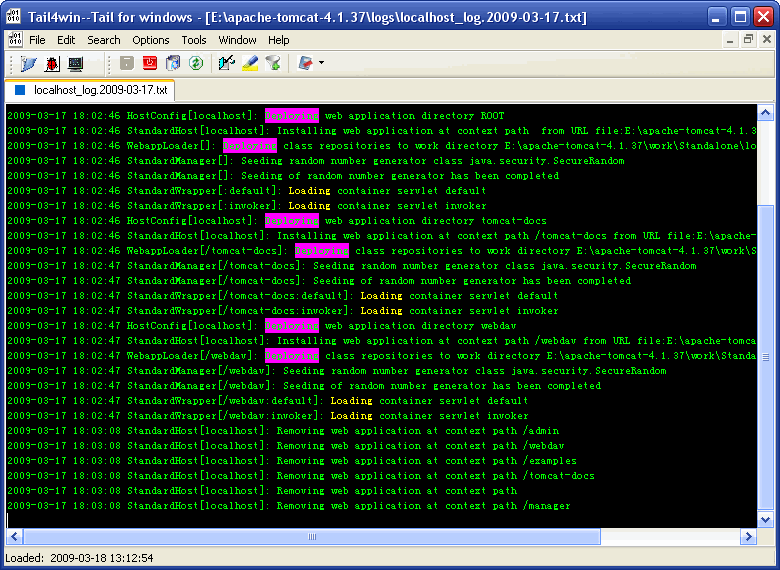
Rules and filters combine usefully: a filter to drop the routine chatter, a highlight to keep the eye on the one thing being investigated - which is the practical middle ground between "too much" and "not enough context". See filtering for the other half.
What it will not do
- It does not stop the log. Highlighted lines still scroll if the log is busy; marking makes them noticeable, not permanent.
- It does not understand levels. A rule matches text, so it highlights whatever you asked it to match - including a line that mentions "error" in a message about there being none.
- It does not analyse the lines. No counting, no grouping, no rates. That is what sending the log somewhere else is for.
- It does not apply to files you have not opened. Rules belong to the files in the session; a new log means adding the rules to it.
Related
Hiding instead of marking: filtering a busy log, tail with grep. Following a file: watching a live log, two files at once. Logs that change name: rotated logs.