Tail4win » Use cases » Rotated logs
Download Tail4win Free Trial » Buy Tail4win Now »
The situation
Most servers do not write one endless log. They write one file per day, or per hour, and the name carries the date: catalina.2024-06-01.log, app.%yyyy%-%mm%-%dd%.log, an IIS log directory with a file per day. Following that is more than following a file: at midnight the file you opened stops growing and a new one starts, and yesterday's task opens yesterday's log.
The same is true of a session saved today and loaded next month.
What you do
- Use Open Special File rather than opening a fixed file.
- Write the name as a pattern with date placeholders -
%yyyy(year),%mm(month),%dd(day),%hh(hour) - for examplelogs\catalina.%yyyy%-%mm%-%dd%.log. - Tail4win resolves the pattern for the current date, so opening it tomorrow opens tomorrow's file.
- Save it in a session: the session keeps following whichever file the pattern points at, instead of a name that is already stale.
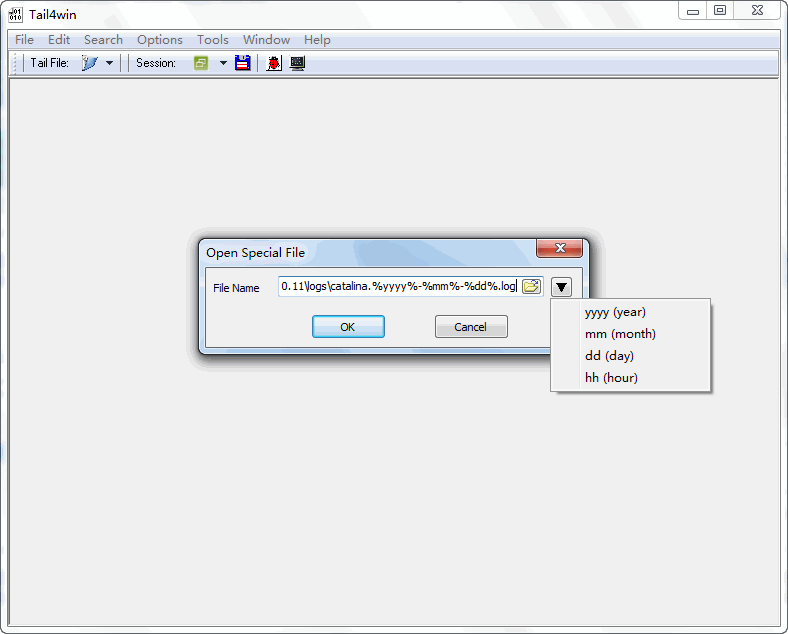
This is what makes a saved task survive: a session built around a pattern is still correct next week, and a command-line call with the same pattern can be scheduled without editing it. It is also the difference between watching a log and watching the log archive grow.
What it will not do
- It does not follow the rollover itself. The pattern resolves to the file for the time it is opened; a session opened just before midnight is watching the file that is about to be replaced. Reopen it, or use the pattern with the hour placeholder to make the boundary explicit.
- It does not know your rotation scheme. The pattern has to match how the application actually names its files - including the folder, if that changes by date.
- It does not read archives. Compressed rotated files (
.gz,.zip) are not the live log; they are history, and belong to whatever tool you keep history with. - It does not merge a day's files into one view. Each pattern resolves to one file at a time.
Related
Following a plain file: watching a live log. Servers that rotate: Tomcat, IIS, Apache, MySQL. Repeating it: sessions, command line. Narrowing the stream: filter, highlight.