Tail4win » Use cases » Two services, one screen
Download Tail4win Free Trial » Buy Tail4win Now »
The situation
A request passes through more than one component, and each of them writes its own log: the web server and the database, the front end and the job runner, two services of the same application. When something fails, the evidence is split across those files - and the interesting lines are seconds apart.
Reading them one at a time means alt-tabbing, and losing the thread of what happened when.
What you do
- Open both files. They can be dragged from Windows Explorer into Tail4win, or opened from the Explorer context menu.
- Watch them in the same window, each following in real time.
- Give each file its own highlight rules if the markers differ, and save the whole set as a session.
- Reproduce the problem. Next time, the session opens the same two files in one click.
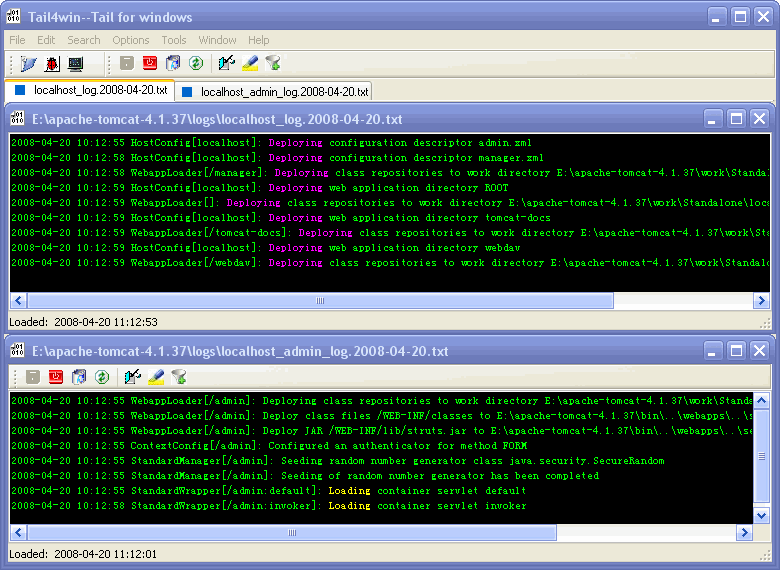
It is also the practical way to compare behaviour: run the same action against a working component and a broken one, and watch both logs in one window rather than in two applications. The same feature is what makes the IIS and MySQL cases less tedious - the web log and the database log belong together.
What it will not do
- It does not merge the files into one interleaved stream. Each file keeps its own pane; correlating timestamps across them is a judgement you make by eye.
- It does not collect logs from remote machines. The files have to be reachable - a network share works, a log shipping pipeline is a different tool.
- It does not correlate requests automatically. If you want to follow one request id across services, that is what highlighting and filtering are for.
- More windows do not mean more speed. Each followed file is read as it grows; dozens of large logs at once is a lot of disk traffic.
Related
Following a single file: watching a live log. Narrowing what you see: filtering, highlighting. Reopening the same set: sessions. Command line equivalents: Tail4win command line, tail and grep on Windows.