I work for myself - the invoices still have to become a ledger

No accounts department, no big system. The invoices and receipts arrive as PDF and e-invoice XML, and once a quarter somebody - you, or your accountant - wants them as a spreadsheet and wants the originals to still be there.

The Situation

A folder called invoices-2026. In it: PDF invoices from suppliers, the odd e-invoice XML from a bigger client, and a handful of receipts. Nothing about the file names tells you the vendor, the number, the date or the amount - and retyping them into a spreadsheet is exactly the job you keep putting off.

What You Do

1

Point it at the folder

Add the files, or the whole folder - sub-folders included. Nothing is uploaded anywhere.

2

Check the reading

The table shows vendor, invoice number, dates, currency, subtotal, tax, total due and the line items - and for every value, the word or line it was read from.

3

Fix a supplier once

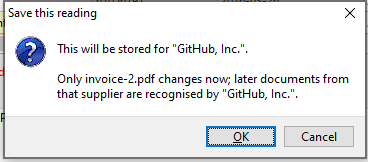
When one supplier's layout reads wrongly, correct the cell and save it as a rule for that supplier. Next month's invoice from them is read that way.

4

Make the table

Excel or CSV with the columns you choose, or the line items on their own - ready for your books or for your accountant. The originals stay in a local archive.
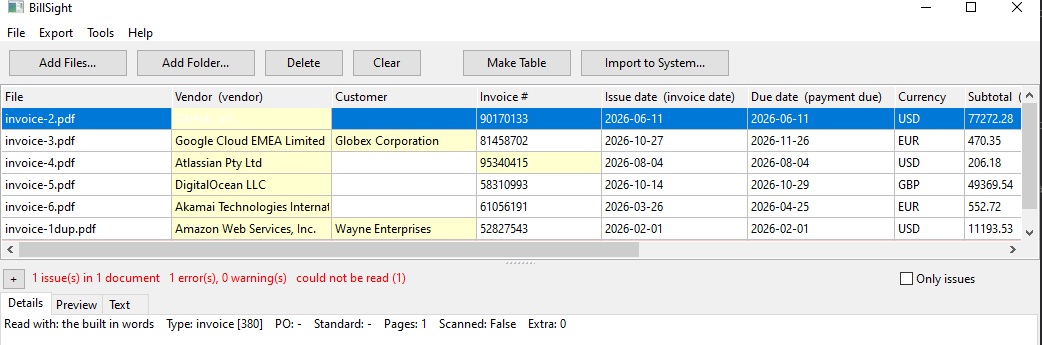
The invoices from a folder read into one table: vendor, invoice number, dates, currency, subtotal, tax and total due

Why It Suits Working For Yourself

The fields your books need

Vendor, customer, invoice number, issue date, due date, currency, subtotal, tax, total due and the line items - the columns an accountant asks for, without retyping them.

E-invoice XML read exactly

Factur-X, ZUGFeRD, UBL, CII, CFDI, NF-e, FatturaPA and Facturae are read from the XML itself - and so is the XML embedded inside a PDF. No picture, no guessing.

Everything stays on this computer

No upload, no cloud account, no network. Useful when the invoices are not only yours - a client's paperwork never leaves your machine.

Saving a corrected value as a rule for that supplier

And You Can Still Open the Original

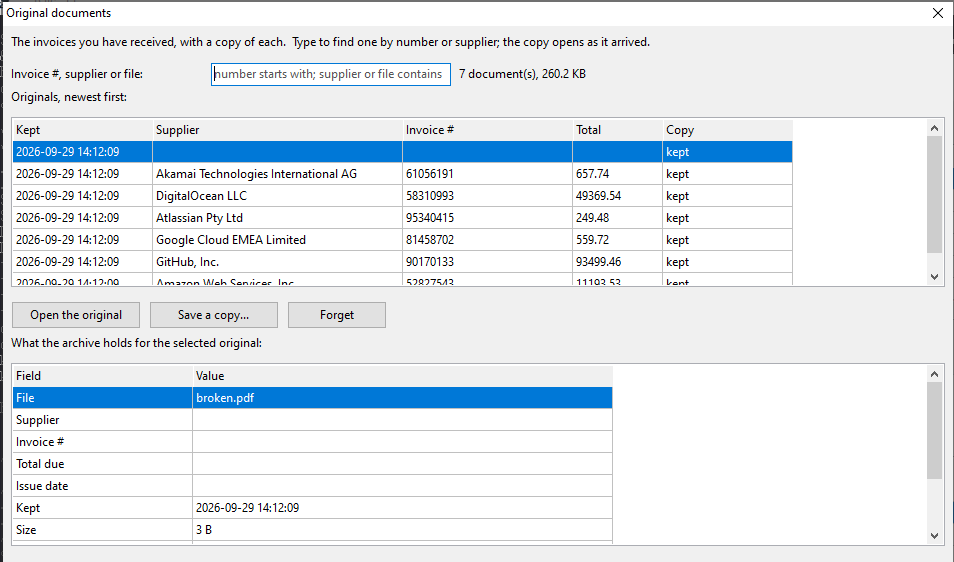
The row in the spreadsheet is not the document. Every invoice taken in is copied into a local archive before anything is read from it - including the ones that could not be read at all. Months later, Tools → Original documents... searches that archive by invoice number, by supplier, or by the file name it came in as, and the original opens as the PDF it always was.

The archive of original invoices, searched by supplier

One Thing It Will Not Do

It does not read scans or photos. If a PDF has no text layer - a photographed receipt, a faxed statement - BillSight says so and reads nothing from it, rather than inventing numbers. Those still have to be typed in by hand, and it will tell you which ones they are instead of quietly skipping them.

Other Things People Do With It

Turning a month of invoices into one spreadsheet · Catching an invoice that has already been paid · Proving what arrived, and that it has not changed · Keeping the invoices off somebody else's server

Everything happens on this computer - your invoices are never uploaded.