BillSight reads the fields your books need - vendor, invoice number, dates, currency, subtotal, tax, total due, line items - from invoice PDFs and e-invoice XML, and hands you a clean Excel or CSV. It runs on your own computer. And when it is not sure about a value, it says so, instead of filling in a number that looks plausible.
Support Windows, Linux & macOS

In: invoice PDFs that carry a text layer, and e-invoice XML. Out: Excel, CSV, line items, or UBL.
What it will not pretend to read: scans and photos. When a document has no text to read, BillSight says "this looks like a scan" and stops there - it does not invent numbers for you to check later. (OCR is not in this version.) An invoice that arrives as e-invoice XML - on its own or embedded in the PDF - is read exactly, so it needs no guessing at all.
Vendor, customer, invoice number, issue date, due date, currency, subtotal, tax, total due, invoice type code and PO number - plus the line items, when the document has them.
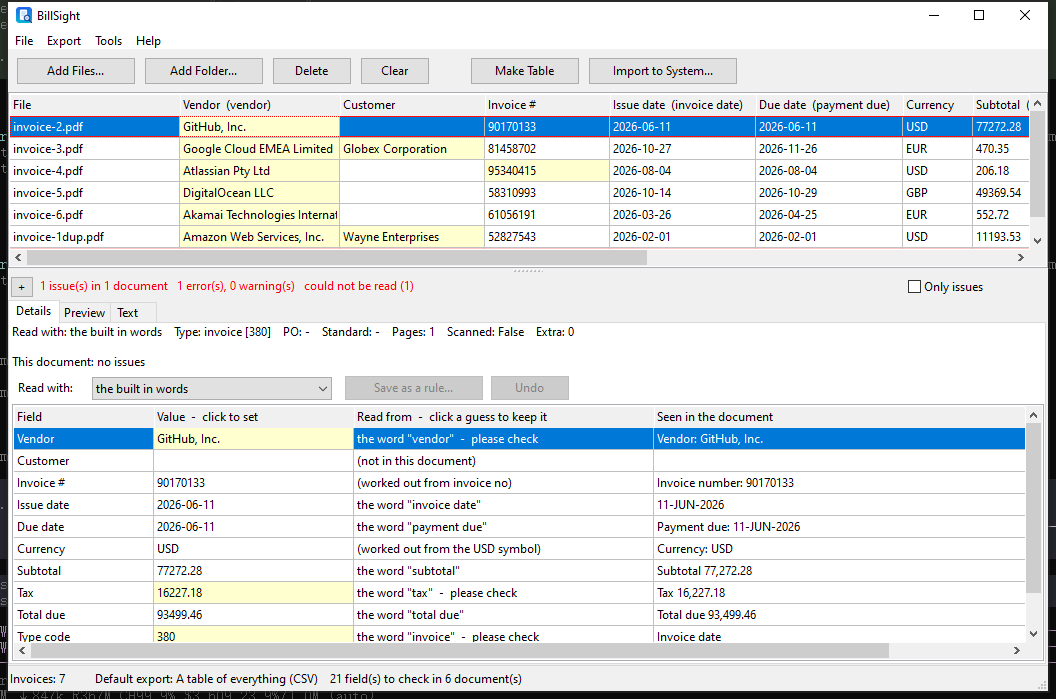
Every value carries where it came from - the word it was read from, the line it was on, or the rule that produced it. The ones it is not sure about are tinted and marked please check, so you look at those, not at all of them.
Factur-X, ZUGFeRD, UBL, CII, CFDI, NF-e, FatturaPA and Facturae are read from the XML itself, and so is the XML embedded inside a PDF - no picture, no guessing.
When one supplier's layout is read wrongly, fix the value in the table and save it as a rule for that supplier. The next invoice from them is read that way.
Subtotal plus tax against the total, dates that cannot be right, invoice numbers that appear twice, fields a standard requires - all checked, and an export you can stop before it writes anything.
No upload, no cloud account, no network. Your invoices - and the copies BillSight keeps of the originals - are files on your own machine.
Drag in a single invoice, or point it at a folder and let it take the sub-folders too.
The table shows each field, where it was read from, and the line in the document it came from. A wrong value is fixed in the cell, not in the PDF.
Excel or CSV with the columns you choose, a saved template for your accounting system, the line items on their own, or a UBL e-invoice for the customer.
Note: amounts come out as plain numbers with a dot (1240.00) and the currency as an ISO code, so nothing has to be cleaned up before the spreadsheet or the accounting system sees it.
Note: every value keeps its Read from and Seen in the document columns, so a figure can always be traced back to the line it came from - and a value the reader is unsure of is marked instead of trusted.
A field the document does not carry stays empty. A line-item list that does not add up to the stated subtotal is dropped rather than repaired. An amount or date that cannot be parsed is left blank - not guessed.
Each row shows the word or rule the value was read from, and the line it was read on. A reading you agree with can be accepted in one click and stops asking.
Every invoice taken in is copied into a local archive, addressed by its own content hash. The same file arriving twice is stored once - and you can search the archive by invoice number, supplier or file name.
No - and it will tell you so rather than guess. When a PDF has no text layer, BillSight reports it as "this looks like a scan" and reads nothing from it. OCR is not part of this version. Invoices that arrive as e-invoice XML are read exactly, from the text itself.
No. BillSight is a desktop application that processes everything locally. Your invoices never leave your computer and no cloud account is required.
Factur-X, ZUGFeRD, UBL, CII, CFDI, NF-e, FatturaPA and Facturae - and the XML embedded inside a PDF. An output in UBL 2.1 can be written as well, with line items.
Fix it in the table - the exported file uses the value you left there. If it is a supplier you deal with regularly, save the correction as a rule for that supplier and the next invoice from them is read that way.
Excel (XLSX), CSV or TSV with the columns you choose; the 11 standard columns your accounting system wants; the line items on their own; or a UBL 2.1 e-invoice. A column set can be saved as a template, so the next export is one click.
There is no fixed limit. BillSight supports recursive folder scanning and can batch extract large numbers of invoices in a single run, with a progress bar you can stop.