Subtitle Converter

Batch convert subtitle files effortlessly

Converting subtitle files one by one is a waste of time. SubtitleConverter is a lightweight, fast and reliable tool designed to batch convert subtitle files (SRT, VTT, ASS/SSA, SMI, XML/TTML, etc.) into 10+ formats with zero quality loss. Save your time and boost your workflow.

Support Windows, Linux & macOS

subtitle converter

Key Features

Batch Conversion

Convert 1000+ subtitle files at once with recursive folder scanning. No file quantity limits for regular use.

10+ Format Support

Convert between all major subtitle formats with zero quality loss: SRT, VTT, ASS/SSA, XML/TTML, DFXP, SMI, MicroDVD (.sub), SubViewer2.0, YouTube (.sbv), SubRip(.srt), LRC and more.

100% Offline

All processing is local - your subtitle files never leave your device, protecting data privacy.

Cross-Platform

Works on Windows 10/11, macOS 10.15+, and Linux Ubuntu 20.04+ with the same easy-to-use interface.

How It Works

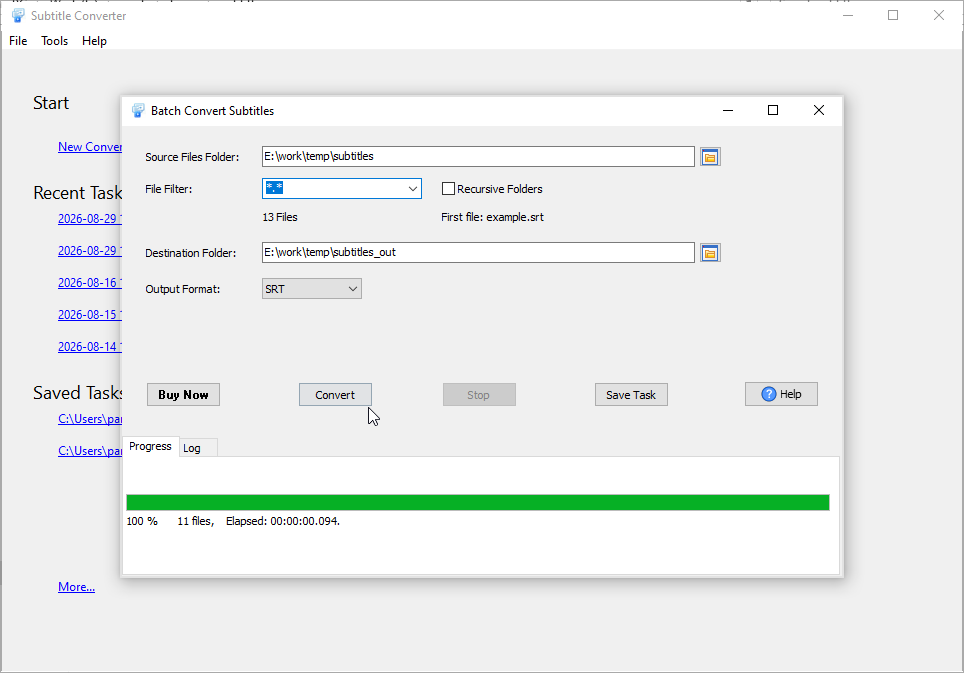
1

Select Source Folder

Choose the folder with your SRT subtitle files.

2

Choose Output Format

Select CSV/TXT or your desired subtitle format.

3

Start Conversion

Click convert and track progress in real-time.

Supported Formats

Most Popular Conversions: SRT ↔ CSV, SRT ↔ TXT, SRT ↔ VTT

SRT CSV TXT VTT ASS/SSA XML/TTML DFXP SMI MicroDVD (.sub) SubViewer2.0 YouTube (.sbv) LRC

Conversion Examples

SRT to CSV / TXT Conversion Examples

SRT → CSV
SRT → TXT
Original SRT File:
1
00:00:01,000 --> 00:00:05,000
Hello, welcome to our video.

2
00:00:06,000 --> 00:00:10,000
This is a subtitle example.

Converted CSV File:
"ID","Start Time","End Time","Text"
"1","00:00:01,000","00:00:05,000","Hello, welcome to our video."
"2","00:00:06,000","00:00:10,000","This is a subtitle example."

Note: CSV output includes structured columns for ID, start time, end time, and subtitle text. You can customize the CSV delimiter (comma, semicolon, tab) in the tool settings.

Original SRT File:
1
00:00:01,000 --> 00:00:05,000
Hello, welcome to our video.

2
00:00:06,000 --> 00:00:10,000
This is a subtitle example.

Converted TXT File (Pure Text):
Hello, welcome to our video.
This is a subtitle example.

Converted TXT File (With Timestamps):
[00:00:01] Hello, welcome to our video.
[00:00:06] This is a subtitle example.

Note: TXT output can be customized to include only pure text (without timestamps) or keep timestamps in a simplified format. The tool preserves line breaks and special characters.
Frequently Asked Questions

What subtitle formats does SubtitleConverter support?

SubtitleConverter supports 15+ subtitle formats, including SRT, VTT, ASS/SSA, XML/TTML, DFXP, SMI, MicroDVD (.sub), SubViewer2.0, YouTube (.sbv) and LRC. It is specialized in SRT to CSV/TXT conversion for easy subtitle data processing.

How many subtitle files can I convert at once?

There is no strict quantity limit. SubtitleConverter supports recursive folder scanning and can batch convert 1000+ subtitle files in a single run.

What is included with purchase?

All purchases include full license to use the software, free minor upgrades and free technical support by e-mail.